


Work order system: what it needs and how the MadBuilder agent built one
Work order system: what it needs, plus a real step-by-step of the MadBuilder agent building one for a repair shop, with a dashboard and PDF work orders.
A work order system is the software that tracks each job from intake to delivery: who the customer is, what equipment came in, which technician is handling it, what status the order is in, how much it will cost and when it will be ready. At a minimum, it needs records for customers, technicians and equipment, orders with status, amounts and dates, a dashboard and the work order as a PDF.
Below, you’ll see what each part does and the step-by-step of a real recording in which the MadBuilder AI agent builds a repair shop system from a written request.
What a work order system needs
These are the parts the repair shop owner asked for in the recording. Each one becomes a screen type:
| Part | What it’s for | Screen type |
|---|---|---|
| Customers | Who brought in the equipment | Form and list view |
| Technicians | Who does the work | Form and list view |
| Equipment | What came onto the bench, with its brand | Form and list view |
| Work orders | Customer, equipment, technician, status, amount and dates | Form and list view |
| Dashboard | Revenue and how the work is going | Dashboard |
| PDF work order | The paper that goes to the customer | Document |
Records linked to each other
The work order points to a customer, a piece of equipment and a technician. That’s why the work order form has to show names, not numbers. Nobody at the bench knows who “technician 3” is. The form with lists that come from the database solves this with a searchable list of names.
Status, amounts and dates
Status says where each order stands. In the recording’s example, there are five: open, waiting for part, in repair, ready and delivered. Currency amounts and dates in the local format prevent mistakes when billing and agreeing on deadlines.
A list view for day-to-day work
With hundreds of orders, the team needs to find a work order fast. Search, filters and pagination are the minimum. The list view with filters, totals and export also sums values in the footer and exports to CSV, Excel or PDF.
A dashboard with the business numbers
Whoever runs the repair shop wants to know how much was billed, how many orders are open and who has the most work. In the dashboard with indicators and charts, each card and each chart runs its own database query. Nobody writes queries by hand.
The work order as a PDF
The printed work order is the receipt the customer takes home. In MadBuilder, it’s a PDF document built from the record’s data, the same page type used for invoices, contracts and receipts, with delivery by email or as an attachment.
How to build a work order system with the MadBuilder agent
The site’s home page has a real 2 min 9 s recording, with narration, in which the agent builds this system from request to PDF. It was sped up in the parts where the agent is working and uses sample data. The recording and its narration are in Portuguese; the quotes below are translations.
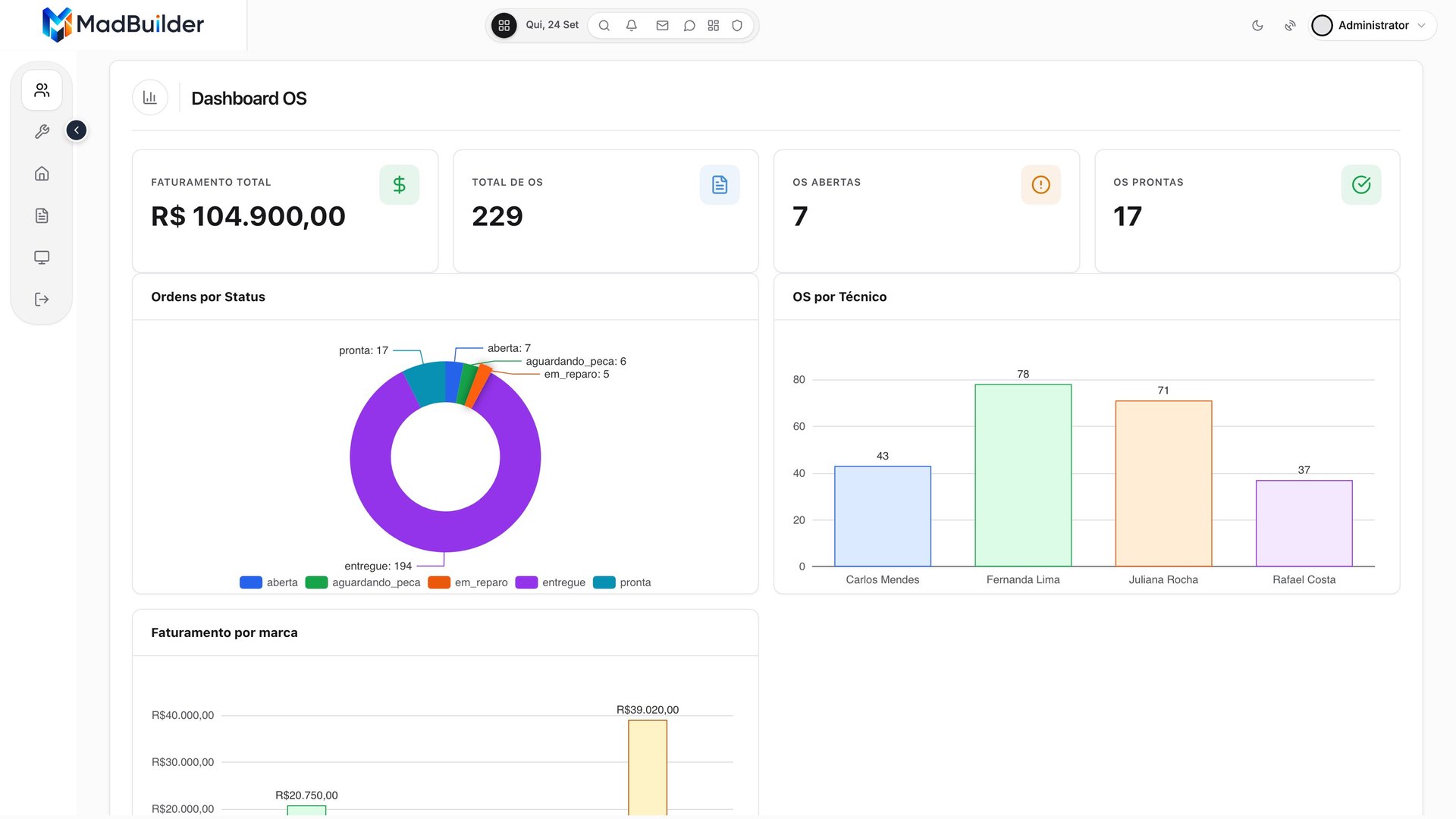
The dashboard of the system created in the recording. Watch the recording on the home page.
1. The request
The narration sums up the start: “the owner of a repair shop asks the MadBuilder agent for a complete system: customers, technicians, equipment and work orders, with a dashboard and the work order as a PDF”. The agent also takes requests in English.
2. A roadmap approved before starting
“First, it builds a roadmap with phases and tasks, and asks for your approval before starting.” The roadmap here is the work plan. In the recording, it was 5 phases and 11 tasks. This is the planning mode of the MadBuilder AI agent: it proposes the plan without touching anything and only writes after you approve.
3. The database tables and the screens
With the plan approved, the agent creates the tables in the database and generates each screen: forms, list views and the dashboard. It all comes out as Laravel code, without you writing a line.
To be exact: the project is regular Laravel, with Eloquent, Blade, Alpine, migrations and routes, and it ships the MAD framework in the packages/ folder. The <mad-*> components used in the screens come from there.
4. Testing in Online Test
“Then it spins up the system in Online Test itself, logs in as the administrator user and checks the screens it created.” Online Test is a temporary environment with a public address that uses the same files that go to production. More in publishing, deploy and Online Test.
5. A tweak in the visual editor
“And you’re not stuck with what the AI did.” In the recording, the technician field on the work order form came out as a number. In the visual editor, it becomes a list of the team’s names in a few clicks. Every tweak becomes code right away, in the project’s Blade and PHP.
In Blade, a list linked to another table looks like this (an excerpt from the sales record in the form page):
<mad-dbcombo-field name="cliente_id" label="Cliente" model="Pessoa"
    display="{nome}" order-by="nome" :required="true" />
6. The work order document linked to the data
In the work order document, each field is linked to the customer’s and equipment’s data, right in the editor panel. Every printed work order pulls the information from its own order.
7. The system running
The end of the recording shows the system live, with 229 work orders, 60 customers and 4 technicians registered:
- The list view has search, filters and pagination.
- The form shows the equipment and the technician by name, with the amount and dates in the right format.
- The dashboard shows revenue, orders by status, each technician’s workload and revenue by brand.
- The work order comes out as a PDF, ready to print and hand to the customer.
What the recording doesn’t show
Worth being clear about:
- Time is sped up. The parts where the agent works play faster. The real work takes longer.
- The data is sample data. The 229 orders, 60 customers and 4 technicians are fictitious.
- There was manual tweaking. The technician as a list and the PDF fields were adjusted in the visual editor, after the agent’s work. That’s the idea: the AI builds the base and you adjust it visually.
Where to start
If you’d rather start without the agent, data modeling has 13 domain templates, and one of them is a work order with SLA (the response time agreed with the customer). You start from a ready-made diagram and adjust the tables.
Once it’s ready, the system can run on MadCloud, the managed hosting in São Paulo, with HTTPS, a database with 30-day backups and staging, or on your company’s server, over SSH or Git. If you run the business and don’t code, see MadBuilder for businesses.
Frequently asked questions
Do I need to know how to code to build a work order system?
Not to build the screens. You describe the system in English and the agent builds it, or you drag components in the visual editor. Very specific rules of your business are easier with a developer around, and they’ll find a regular Laravel project.
Does the system get locked into MadBuilder?
No. On the paid plans, you can download the whole project at any time. It’s a Laravel project with the MAD framework included in the packages/ folder, and it runs on your server or on MadCloud. If you stop using MadBuilder, the system keeps working.
Does the PDF work order come out with each order’s data?
Yes. The document is built from the record’s data. In the recording, the fields were linked to the customer’s and equipment’s data in the editor panel.
How much does it cost?
The Free plan covers 1 project with up to 20 tables. To download the code and publish to your own server, paid plans start per developer per year. The AI agent works with your own API key on the Pro AI plan, or with the included AI of the Mad Coding Plan, a monthly add-on that requires the Pro plan. Details are on the pricing page.
