


MCP in Laravel: what the Model Context Protocol is and how to connect Claude Code to your project
Laravel MCP in practice: what the Model Context Protocol is and how to connect Claude Code to a project, with one token per project and every call logged.
MCP (Model Context Protocol) is an open standard, published by Anthropic in 2024, that defines how an AI agent connects to outside tools and data. In MadBuilder, it lets Claude Code, Cursor or another MCP client create screens, generate records, model the database and publish a Laravel project, with one token per project and every call logged.
What MCP (Model Context Protocol) is
An AI agent only knows what’s in the conversation. To query a database or change a system, someone has to connect it to those things, and before MCP every connection was built a different way, for each tool and each agent.
MCP standardizes that conversation. On one side, the MCP server exposes tools: actions with a name, a description and parameters, like “list orders”. On the other, the MCP client, the app where the agent runs, asks what the server offers, and the model decides when to call each tool.
Two points help avoid confusion:
- MCP is not an AI model. It’s the protocol between the agent and the tools, and one server serves any client that speaks MCP.
- The protocol defines how to ask. Which tools exist and who can use each one is up to whoever builds the server.
Claude Code, Anthropic’s coding agent that runs in the terminal, is an MCP client. So is Cursor.
Why MCP matters if you maintain Laravel systems
If you already use Claude Code in a Laravel repository, you know how it works: it reads the files, infers the structure and writes code. It works, but every new record screen gets written by hand: migration, model, controller, view, validation, and the HTML, CSS and JS for each field.
With an MCP server, the agent swaps part of that guesswork for purpose-built tools. Instead of writing several files to build a record screen, it calls an action that generates it, in the same project where your team works.
The other reason is control. Giving an agent write access to a real system calls for clear answers: what it can do, how to cut off its access and where the log lives. The server you connect answers those, not the protocol.
What MadBuilder exposes over MCP
MadBuilder generates a regular Laravel project: Eloquent models, migrations, controllers, routes and Blade views with Alpine. The project also ships the MAD framework in the packages/ folder, which provides the <mad-*> components and the MadComponent base class. See in detail what goes into the generated Laravel project.
The MCP Gateway lets you use the MadBuilder agent’s tools outside the editor. Through MCP, your agent can:
- create screens;
- generate records;
- model the database;
- publish.
It all happens in the same project the team edits in the visual editor, PHP and Blade. Want to read the code before connecting an agent? The MadBuilder for developers page shows the files a screen generates.
How to connect Claude Code to a MadBuilder project
The connection is a single command:
claude mcp add madbuilder --token mgw_… --project 1042madbuilderis the name the server shows up under in your Claude Code.--tokentakes the project’s token, which starts withmgw_.--projectsays which project the agent will work on. 1042 is just an example.
After that, just ask in English. Don’t use Claude Code? Cursor or any other MCP client connects too.
Access controls
- One token per project. Each project has its own exclusive token.
- Tool by tool. Each token has a list of allowed tools, and you decide what goes on it.
- Instant revocation. If the token leaks or the work ends, you revoke it and access stops right there.
- Every call logged. Every call is audited, so you can check afterward what the agent did.
To start, enable the tools for modeling the database and creating screens, check the result in the editor, and only then enable publishing, as you would with a new dev on the team.
Which plan includes the MCP Gateway
In the pricing table, the “Access from other AI agents (MCP Gateway)” item is included in the Pro AI plan, priced per developer per year. The plans below it don’t include it. The Mad Coding Plan, a monthly add-on, unlocks the agent, the MCP Gateway and Embed Chat on the Pro plan.
Your agent or ours
Connecting Claude Code takes nothing away from the editor. MadBuilder has its own agent, which reads the database, creates tables and generates screens in the same project. It writes the MAD component tag, not the HTML, CSS and JS behind it, and so it uses 65% to 75% fewer tokens. Here’s an excerpt of a generated form:
<mad-form-grid :cols="2">
    <mad-money-field name="total" label="Total" prefix="$" :decimals="2" :readonly="true" />
    <mad-input-field data-mad-column-id="4536" data-mad-entity-id="693" name="status" label="Status" />
</mad-form-grid>
Each line is a whole field. The rest lives in the component, inside the MAD framework.
With it, you use your own key (Anthropic, OpenRouter, xAI, Z.AI or Ark) or the Mad Coding Plan. In planning mode, it proposes a plan without touching anything and only writes what you approve, item by item. See more about the AI agent that builds screens and databases.
The other side: the generated system becomes an AI tool
So far, MCP has been used to build. It also works for operating: published as an AI tool, the system you generated can be operated by your company’s AI agents over MCP, with defined permissions and an audit trail for every action. In the MadBuilder step-by-step, this shows up as an optional stage after publishing.
Configuring this MCP server takes 9 screens. A few of them:
- Overview: shows whether the configuration is valid, the server address and what’s still missing for the agent to work well.
- System context: the text the agent reads before any call.
- Entities and tools: you choose which models become tools and with which actions.
- Permissions by role: the matrix that decides who can do what.
You also protect personal data field by field, and a configuration with errors is rejected. See the screens in administration and security of the generated system.
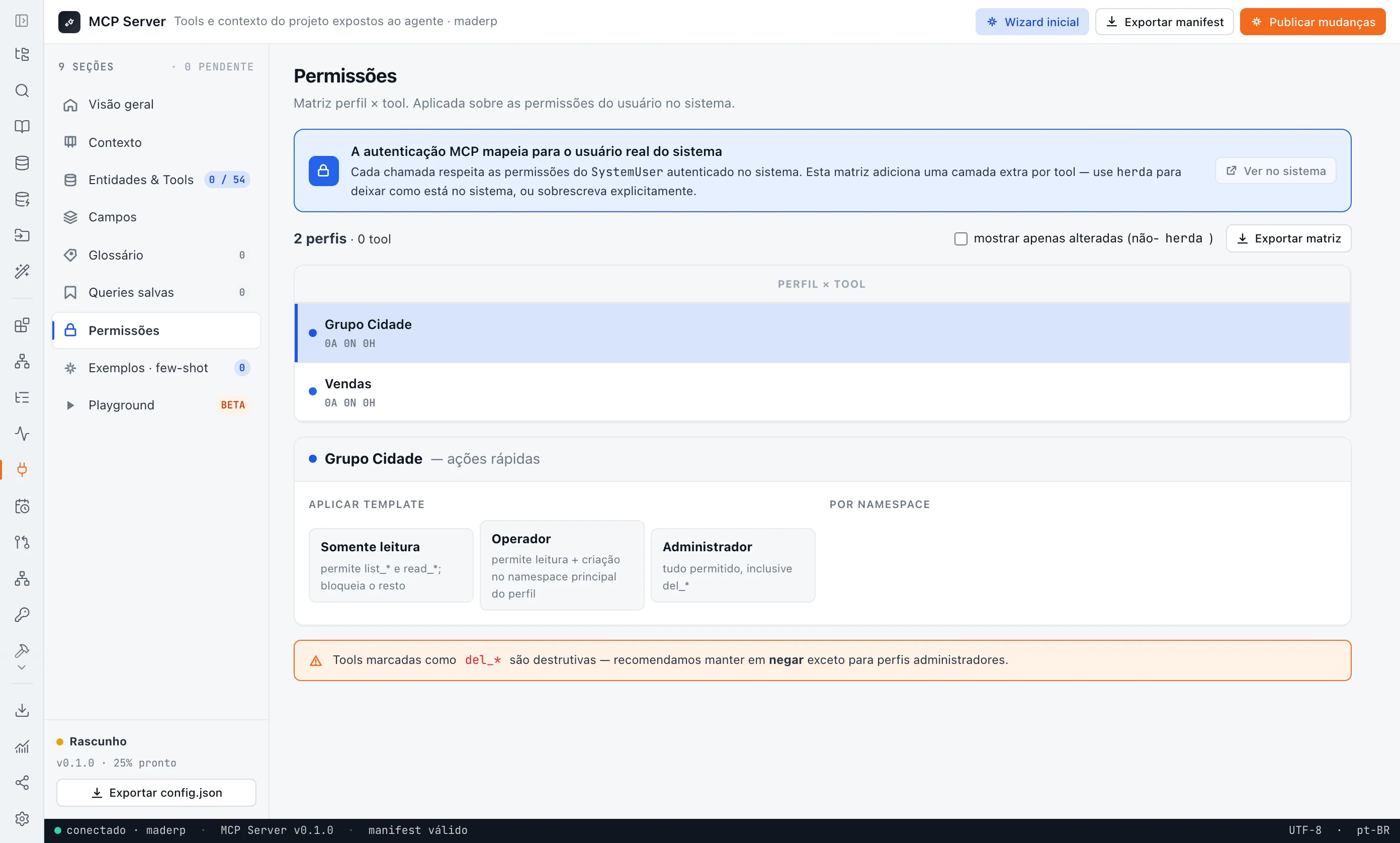
The copilot you can embed in the client’s app follows the same logic: it operates the data over MCP, only uses the tools the user has permission to use and logs every action.
| Point | Your agent in MadBuilder | Agents in the published system |
|---|---|---|
| Purpose | Build: screens, records, database and publishing | Operate the system and its data |
| Who connects | The dev, with Claude Code, Cursor or another MCP client | The company’s AI agents |
| Control | Token per project, tool by tool, instant revocation | Chosen tools, permissions by role, protected personal data |
| Log | Every call logged | Audit of every action |
Frequently asked questions
What is MCP, in a few words?
It’s an open standard, published by Anthropic in 2024, for connecting AI agents to external tools. An MCP server exposes actions, and any compatible client can call them.
Do I need Claude Code to work with MadBuilder?
No. Cursor or any MCP client connects too. Or use MadBuilder’s own agent, with your API key or the Mad Coding Plan.
Can I cut off a connected agent’s access?
Yes. The token is per project and can be revoked instantly. And since every call is logged, you can see what the agent did up to that point.
Which plan includes the MCP Gateway?
Pro AI. On Pro, it’s unlocked by the Mad Coding Plan, a monthly add-on. See also the answer on connecting your own AI agent.
