


What is low-code, how it differs from no-code, and how to pick a platform without getting locked in
What low-code is, how it differs from no-code and hand-written code, and 5 practical criteria for picking a platform without getting locked in.
Low-code is a way of building software where much of the system is assembled visually: you design the tables, drag components to form the screens, and configure the rules, while the platform handles the repetitive code. Where the visual tools stop, you write code. It sits between no-code, which needs no code at all, and a hand-written system.
What follows: low-code vs no-code, the risk of getting locked into a tool, five selection criteria, and MadBuilder’s answers, with the real code it generates.
What low-code is, in practice
A low-code platform usually covers four stages:
- Data: tables and relationships, often drawn in a diagram.
- Screens: forms, list views, dashboards and reports built from ready-made components.
- Rules: validations and integrations, part visual and part code.
- Publishing: the path to putting the system online.
The most common use is business management systems and internal tools: records, approvals, work orders. Lots of similar screens, which is where generating the repetitive part saves the most time.
Many platforms now have an AI agent that builds a screen from a written request. The definition doesn’t change: low-code is about how much code you write, not about who writes it.
Low-code vs no-code vs hand-written code
No-code was made for people who don’t program, and its limit is what the tool offers. Low-code accepts code where the visual side doesn’t solve the problem. Hand-written code gives you total freedom, at the cost of writing everything.
| No-code | Low-code | Hand-written code | |
|---|---|---|---|
| Who it’s for | People who don’t code | Devs and mixed teams | Devs |
| How you build | Visual configuration only | Visual, with code where needed | Code from start to finish |
| When a feature is missing | You wait or work around it | You write that piece | You write everything |
| Who maintains it afterward | The platform | Depends on the platform | Your team |
The classic problem: platform lock-in
Many platforms run your system on their own engine, the so-called proprietary runtime. The app only works inside them or with one of their licenses. That’s vendor lock-in:
- The code doesn’t leave. There’s no export, or what comes out can only be read by the tool itself.
- Price follows usage. If the license is per user or per app in production, growing makes it more expensive, and you have nowhere to go.
- Leaving means rewriting. Screens, rules and integrations are rebuilt from scratch.
None of this shows up in the first week. It shows up when the system is already critical and someone asks how much it would cost to move.
How to choose a low-code platform: 5 criteria
Ask the vendor these questions before comparing features.
1. Is the generated code readable?
Ask for the code of a simple screen. Can a dev on your team understand it without training? Can you edit it by hand without the next generation wiping out your edit?
2. Where does the system run?
Only on the vendor’s cloud, or also on your server and in your Git? This matters if you have sensitive data or a rule that it must run behind your firewall.
3. Which database?
Is the database yours, on a mainstream engine, or hidden inside the platform? Can you start from a database you already have?
4. How does the database evolve?
Does a change become a migration (a versioned file that alters the database step by step), or does someone edit production directly? Does renaming a column preserve the data?
5. What happens if you leave?
Can you download the project? Does it run without the platform? What still depends on the vendor? Ask for the answer in writing.
How MadBuilder answers each criterion
MadBuilder is a Brazilian low-code platform that generates Laravel projects. You model the tables in a diagram, build the screens in the visual editor or ask an AI agent in English, and get a project that runs on your server.
Readable code: Laravel low-code with Eloquent, Blade and Alpine
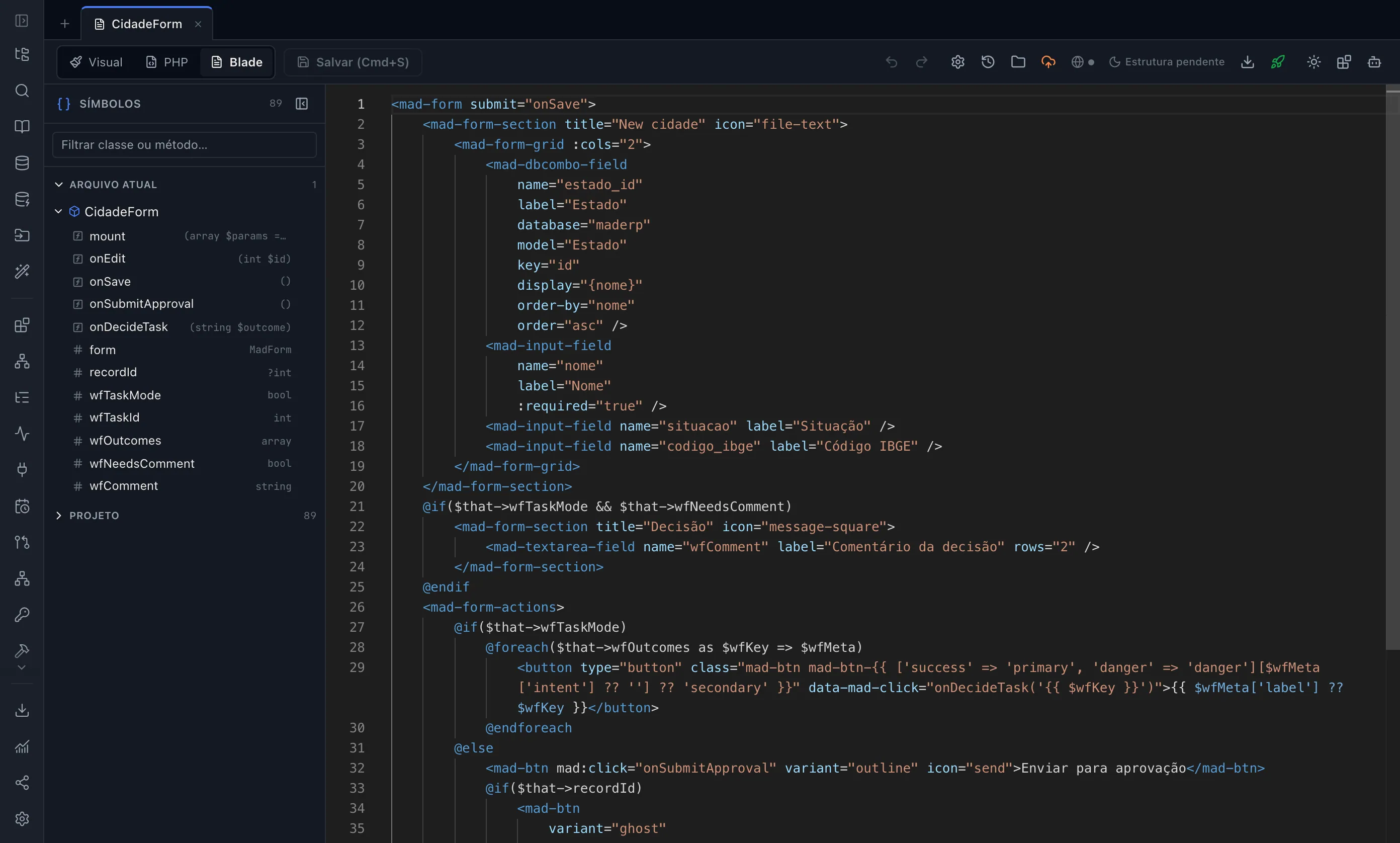
What comes out is a standard Laravel project: Eloquent models, migrations, controllers, routes and Blade views, with Alpine for reactivity. This is the start of the sales model from the example project, as it comes in the download:
namespace App\Models\App;

use Illuminate\Database\Eloquent\Model;
use Illuminate\Database\Eloquent\Relations\BelongsTo;
use Illuminate\Database\Eloquent\Relations\HasMany;
use Mad\Database\Concerns\HasIdPolicy;
use Mad\Database\Concerns\HasMadAudit;

class Venda extends Model
{
    use HasIdPolicy, HasMadAudit;

    protected $connection = 'app';
    protected $table      = 'venda';
Note the last two use lines. The project ships the MAD framework in the packages/ folder. The <mad-*> components in the views and the MadComponent class, the base of the screen controllers, come from it. It’s regular Laravel with a framework of ours alongside: a Laravel dev can read the code, but will need to learn these components to change the screens.
The controller is split into blocks. The parts the editor controls are locked, and the @mad-block:user blocks are yours: when the file is regenerated, they stay as you left them.
// @mad-block:user:uses {

// @mad-block:user:uses }

/**
 * @mad-generated
 * @mad-entity-id 693
 */
class VendaForm extends MadComponent
{
In the editor, Visual, PHP and Blade are three views of the same screen. See more in Laravel code generation and on the for developers and CTOs page.
Where it runs: on your server, in your Git or on MadCloud
Deploy over SSH (with a backup before every publish and the last 5 kept), push to GitHub, GitLab or Bitbucket, or download a ZIP. If you don’t want to set up a server, MadCloud hosts it in São Paulo, with 30-day backups and staging and production environments. Online Test, SSH, Git and ZIP all use the same files: what you tested is what goes live. Details in publishing and deploy.
Database: six options, including the one you already have
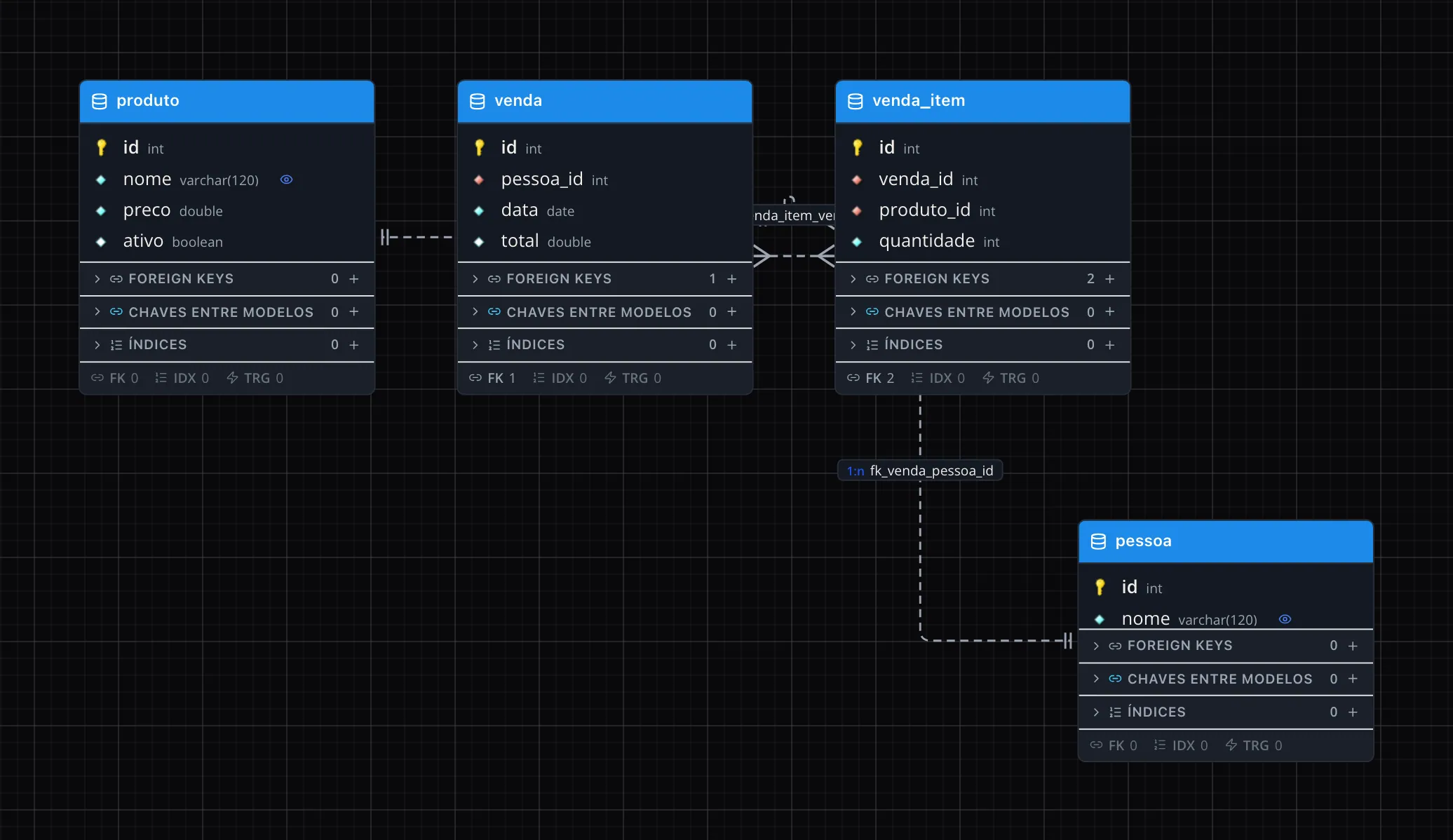
MySQL or MariaDB, PostgreSQL, SQLite, Oracle, SQL Server and Firebird. If the database already exists, paste the CREATE TABLE and the diagram draws itself.
Migrations: the database evolves without losing data
Every change in the diagram becomes an incremental migration, in each database’s dialect. Renaming doesn’t turn into drop and recreate. Every version is recorded with history and comparison, and destructive changes ask for confirmation. See data modeling.
If you leave: the project goes with you, framework included
You download the ZIP or push to your Git. In production, your Laravel project runs on any PHP hosting, with no runtime license. Two things to know beforehand:
- The MAD framework goes with it. It’s inside the project, in the
packages/folder. Whoever takes over the system maintains Laravel plus this framework. - Downloading the code is on the paid plans. The Free plan is for trying things out (1 project, up to 20 tables). Download, SSH and Git start on Starter, priced per developer per year. See pricing and plans.
To see MadBuilder next to Bubble, Retool, OutSystems, Mendix and Power Apps, open the low-code platform comparison.
When low-code isn’t the best choice
Think twice if:
- The interface is the product. A consumer app with a unique look or a game needs control over every detail, and a ready-made component becomes a limit.
- The challenge is technical, not about screens. Heavy processing, a custom algorithm or very low latency call for hand-written code.
- The problem is small. If a spreadsheet or a script solves it, the platform is extra weight.
- Your team doesn’t want the stack. A platform that generates Laravel suits those who accept PHP. With another language on the team, the code ends up with no owner.
- You don’t accept a third-party framework in your code. A MadBuilder project ships the MAD framework, and that counts in the tradeoff.
Low-code pays off most in the opposite case: business management systems with lots of records, list views, approvals and reports. If that’s you, see MadBuilder for businesses that don’t code or the full product overview.
Frequently asked questions
Is low-code the same as no-code?
No. No-code is for people who don’t program and stays within the tool’s limits. Low-code is also visual, but accepts code where the visual side doesn’t reach.
Does a low-code platform generate real code?
It depends. Some run the system on their own engine and don’t hand over any code. Others generate a project you download and maintain. MadBuilder is the second kind.
Can you use low-code with Laravel?
Yes. MadBuilder generates Eloquent models, migrations, controllers, routes and Blade views with Alpine, with the MAD framework in the packages/ folder.
Do I need to know how to code to use MadBuilder?
Not for the basics: you draw the data in a diagram and build the screens by dragging components or asking the agent. Very specific rules are easier with a dev around. See the MadBuilder FAQ.
