


MadServiços: business software for service companies, from proposal to payment
Recurring contracts, work orders and projects in one system. NFS-e Nacional, batch month-end invoicing, Pix copy-and-paste and the customer portal come ready-made.
MadServiços is a ready-made app for service companies such as maintenance, IT, HVAC, engineering and consulting: recurring contracts, milestone or hourly projects and field work orders, with NFS-e Nacional (Brazil's national electronic service invoice), Pix and a customer portal. It's a one-time payment of $— and becomes a project in your MadBuilder account.
In the demo, the Try it now button gives you a sample company of your own for 24 hours, with no sign-up and no password. Buying requires logging in to your MadBuilder account.
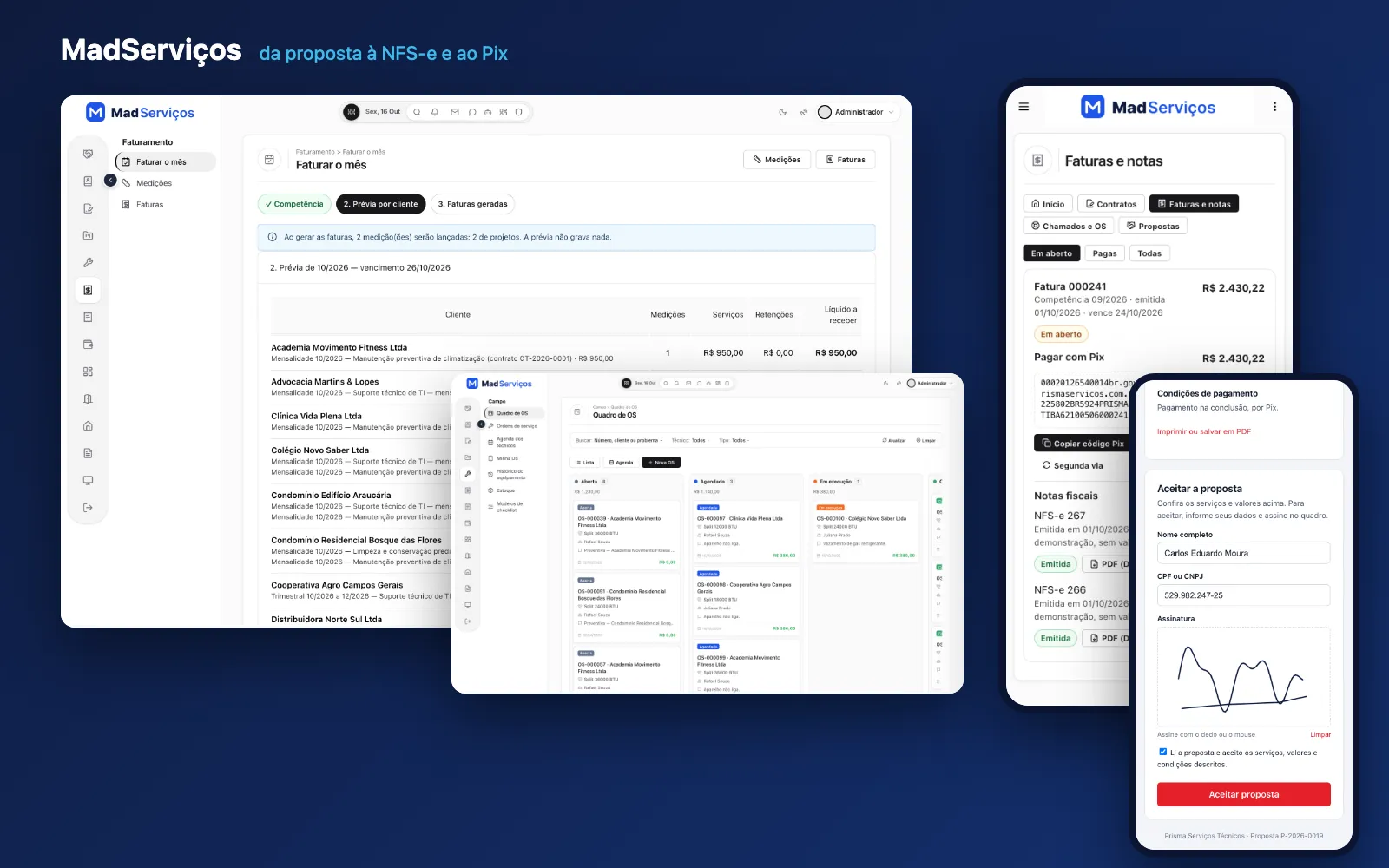
Your browser couldn’t play this video. Open the video file
Read the transcript (in Portuguese)
Your client wants contracts, service orders and invoicing. From scratch, that's months. Brazil's national NFS-e alone is a project.
Start with MadServiços ready-made, and deliver it your client's way.
It comes ready. The opportunity funnel, with value and next action. The proposal, which the client accepts and signs on their phone.
Recurring contracts, with price adjustments and renewal notices.
The field service order, with the client's signature on screen.
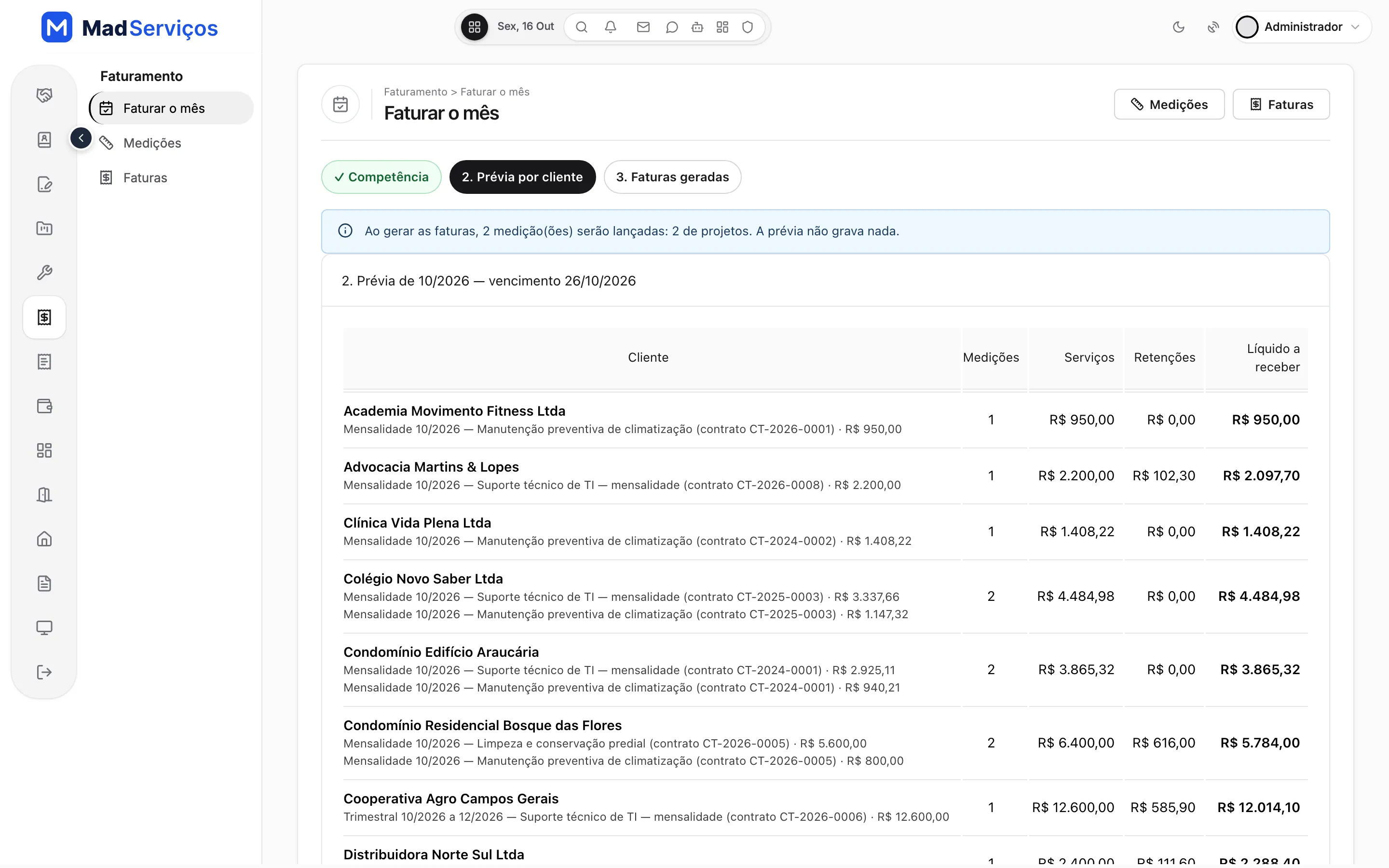
Bill the month in one click: preview, and the invoices for all clients.
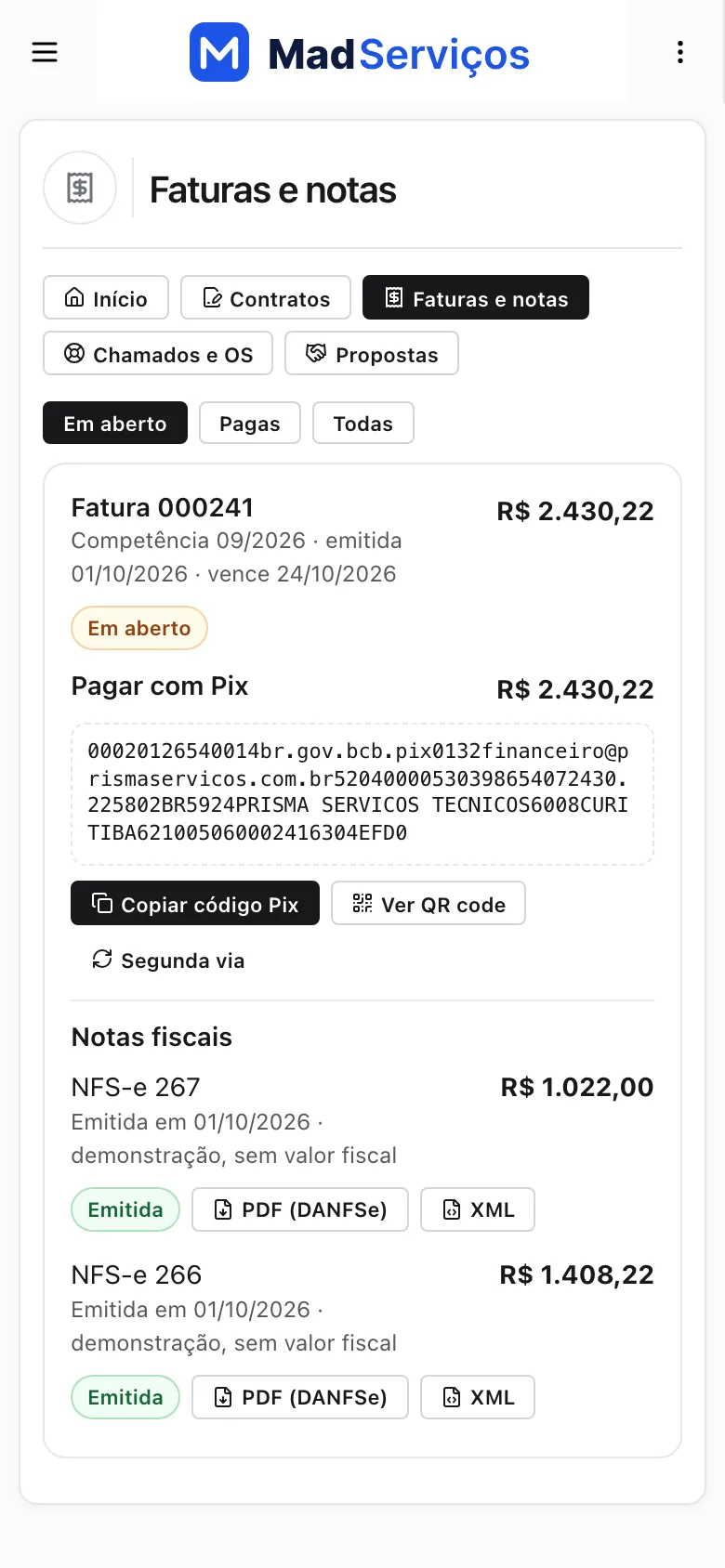
National NFS-e, with DANFSe and XML. Demo, Staging and Production, with your client's certificate. The client portal, with the invoice, the Pix copy-and-paste code, and the invoice as a PDF. And dashboards for billing, overdue payments and recurring revenue.
More than fifty tables, more than seventy screens, and multiple companies per unit.
Now, your work. The system arrives as a project in your account, and you open it in your Studio: screens, tables and code.
Open a screen in the visual editor. Click the column. And change the label to the term your client uses: here, Contracting party.
Save, and click Test now.
In moments, the app already shows the change. Underneath it's PHP, Laravel and Blade. The code is yours, no strings attached. Resell to your end client, under your brand, on the client's server or on MadCloud.
MadServiços. It's under Ready-made apps, inside MadBuilder. Try the demo before you buy.
A system for service companies: contracts, work orders and projects
A system for service companies that brings the proposal, the contract, the work order, the invoice and billing together in one place. Every part below is a screen that comes ready-made.
- Maintenance and HVACPreventive maintenance contracts with a monthly fee, field work orders with a checklist, and the customer's signature on the phone screen.
- IT and supportTickets with response and resolution deadlines, hour allowances with overage, preventive visits and monthly contracts.
- Engineering and projectsMilestone or hourly projects, with phases, a Gantt schedule, weekly timesheets and hour approval before invoicing.
- ConsultingOpportunity pipeline, proposals accepted from a phone, and recurring contracts with price adjustment and renewal.
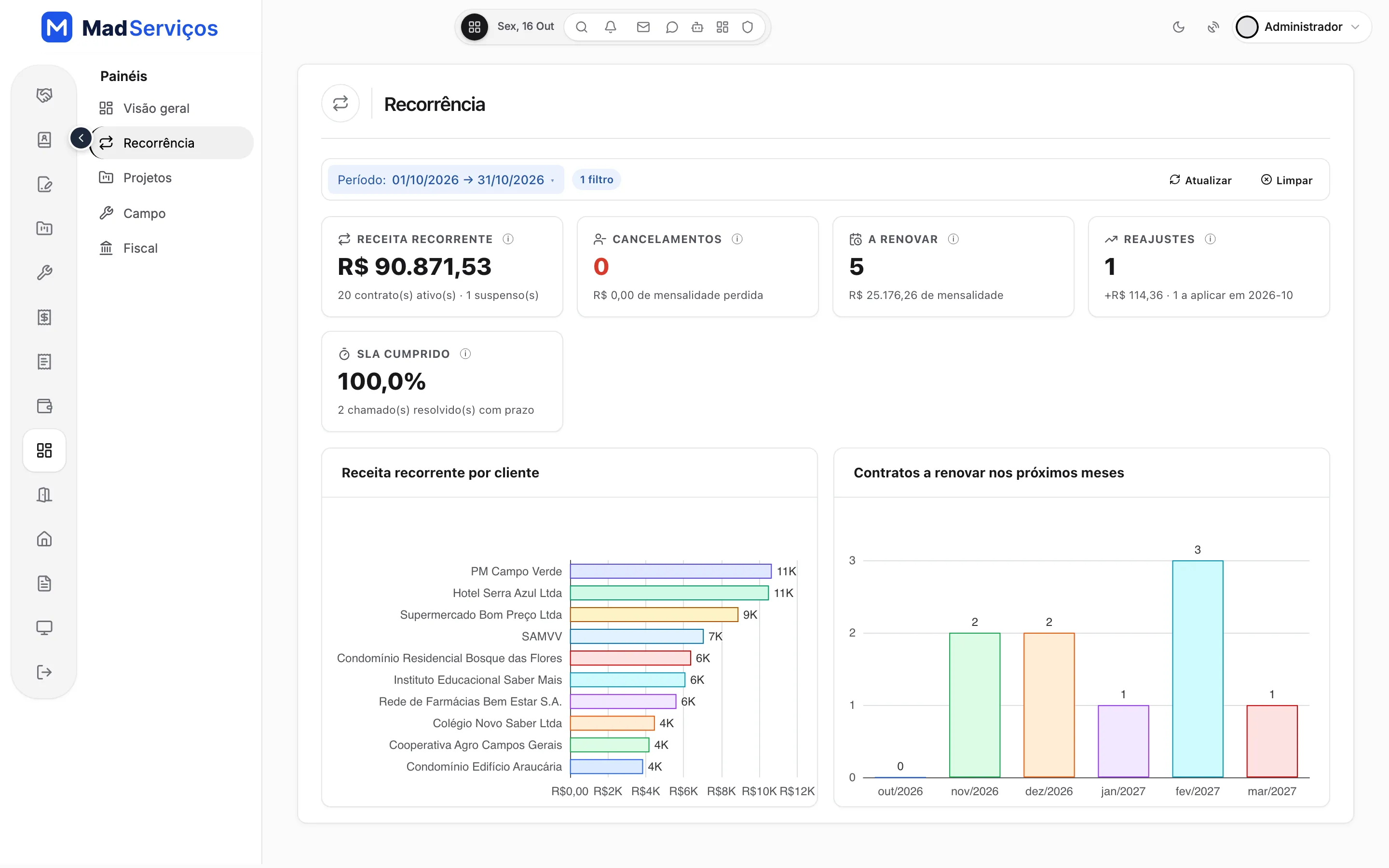
Recurring contracts with index-based adjustment and renewal notices
The monthly contract has pro-rata, index-based adjustment, renewal with notice and amendments. Accepting the proposal generates the contract, the project or the work order, depending on the service sold.
The recurrence dashboard shows revenue per customer, the contracts up for renewal in the coming months, adjustments and SLA met, so no renewal slips by unnoticed.
Sales proposals accepted from a phone, with a sales pipeline
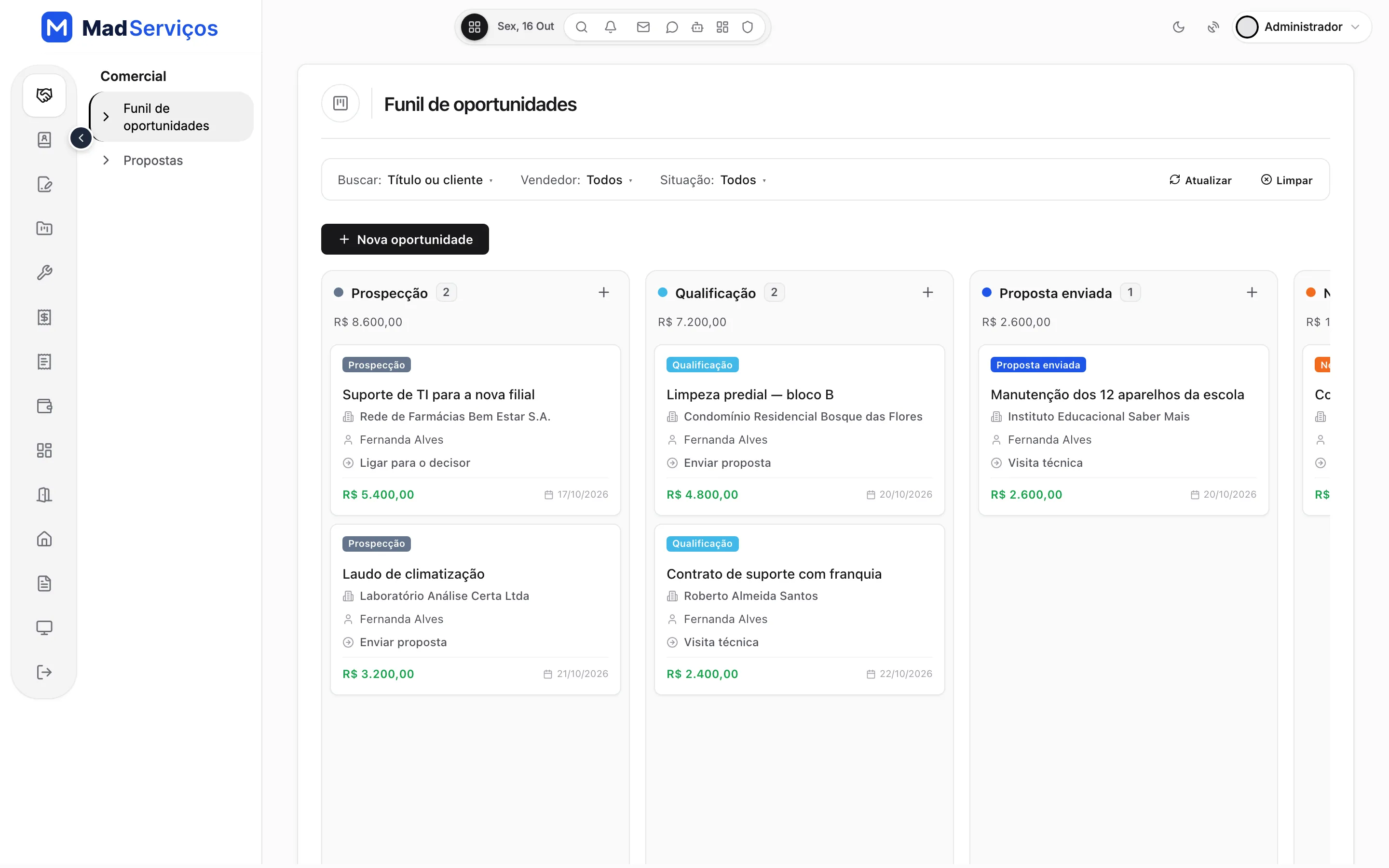
The opportunity pipeline shows each deal on a board, with the value per stage, the salesperson and the next action. The proposal goes out as a PDF with the company's brand.
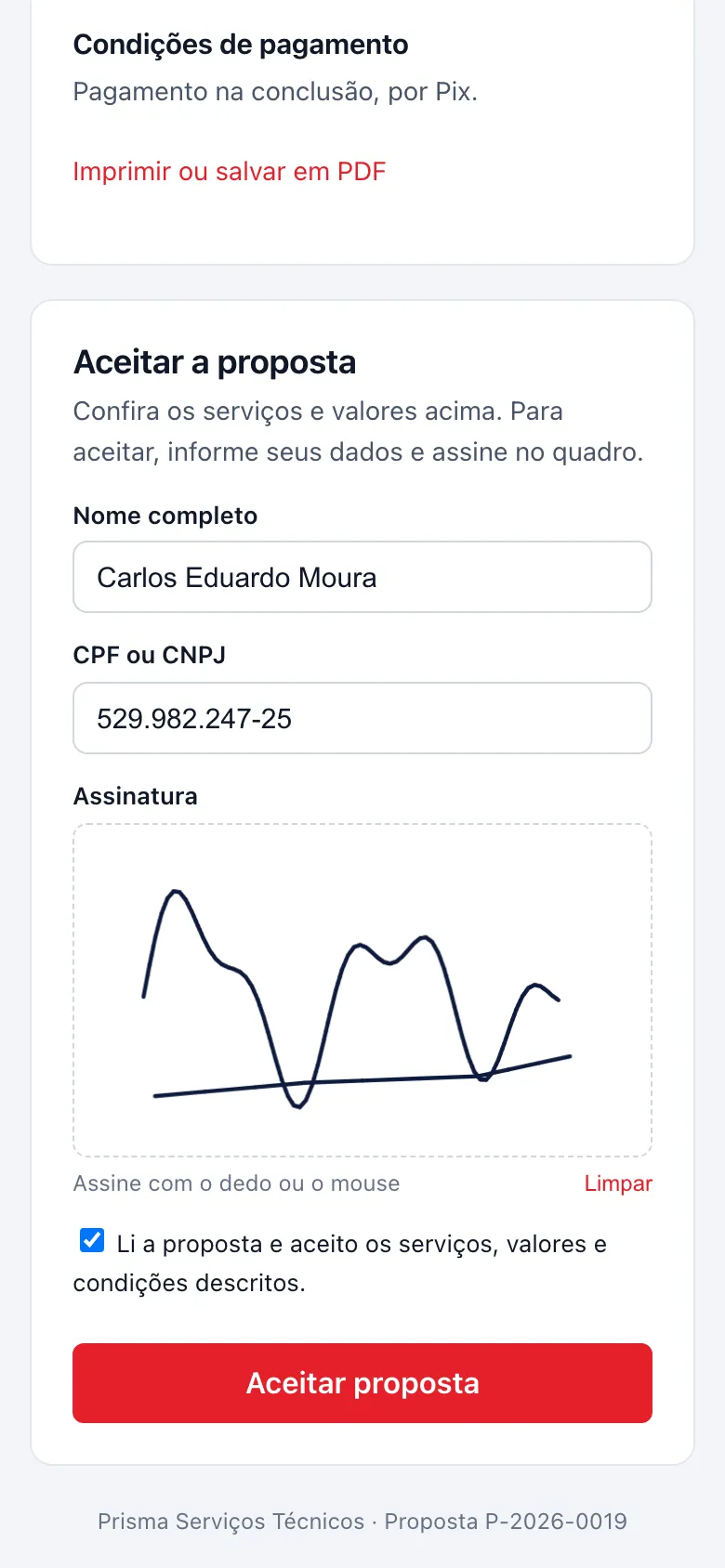
Your customer checks the amounts on their phone, enters their name and CPF or CNPJ (Brazilian tax IDs) and signs with a finger on the signature pad. No printing and no scanning.
Field work orders with the customer's signature on a phone
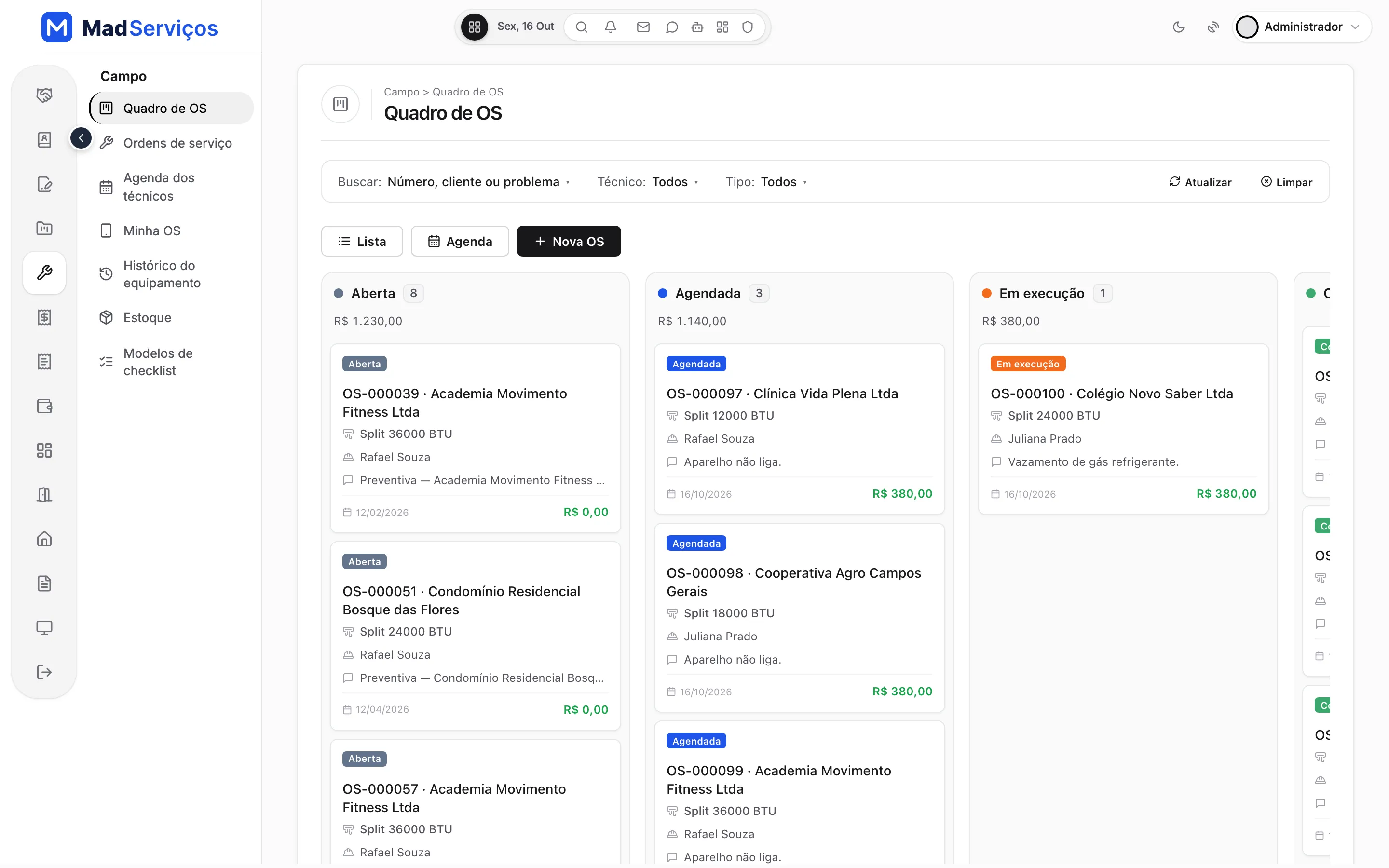
The work order board shows each order by stage, with the technician, the equipment and the amount. The technician schedule and the equipment history live in the same menu.
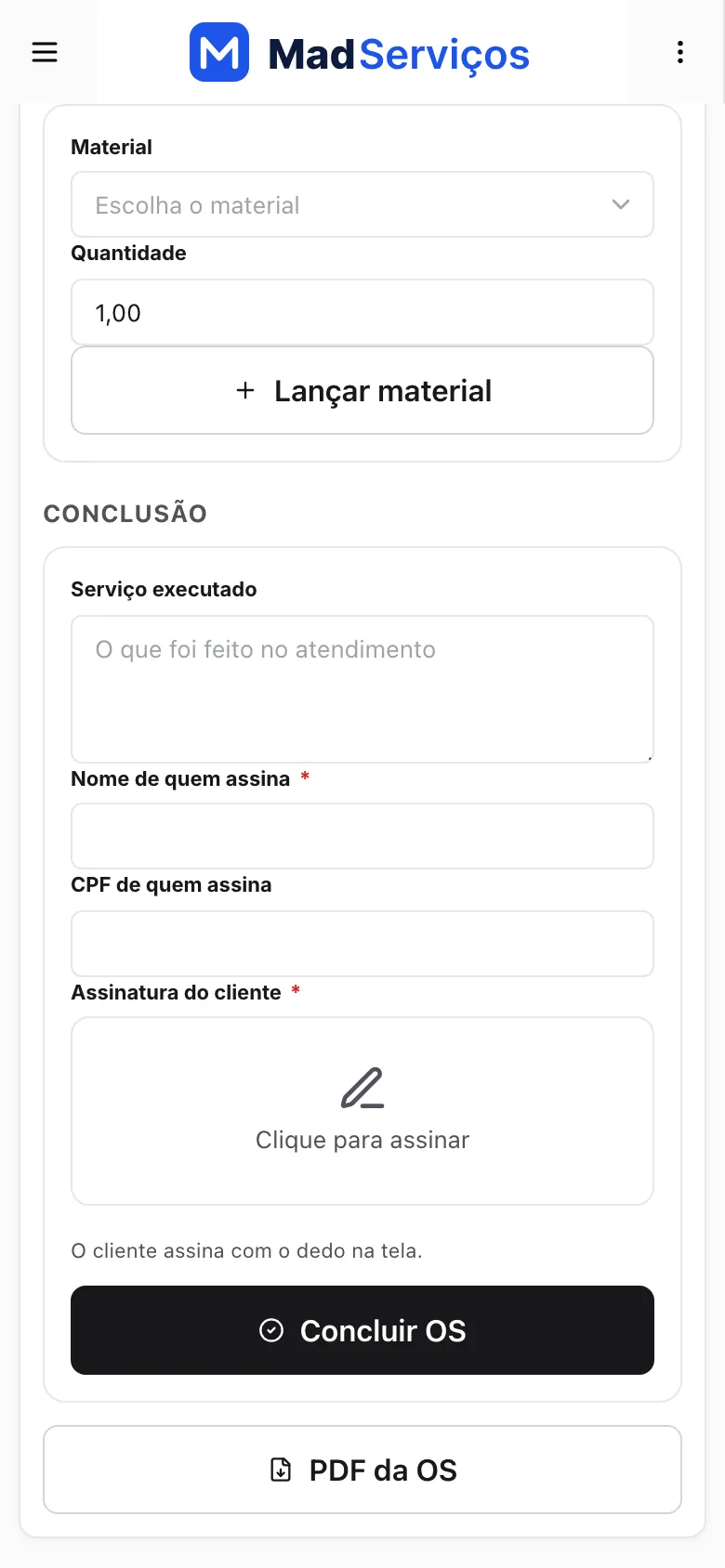
In the field, the technician opens My Work Order on their phone, sees the equipment and the reported problem, logs the material used and the service performed, and the customer signs with a finger on the screen itself. There are checklist templates for each type of service.
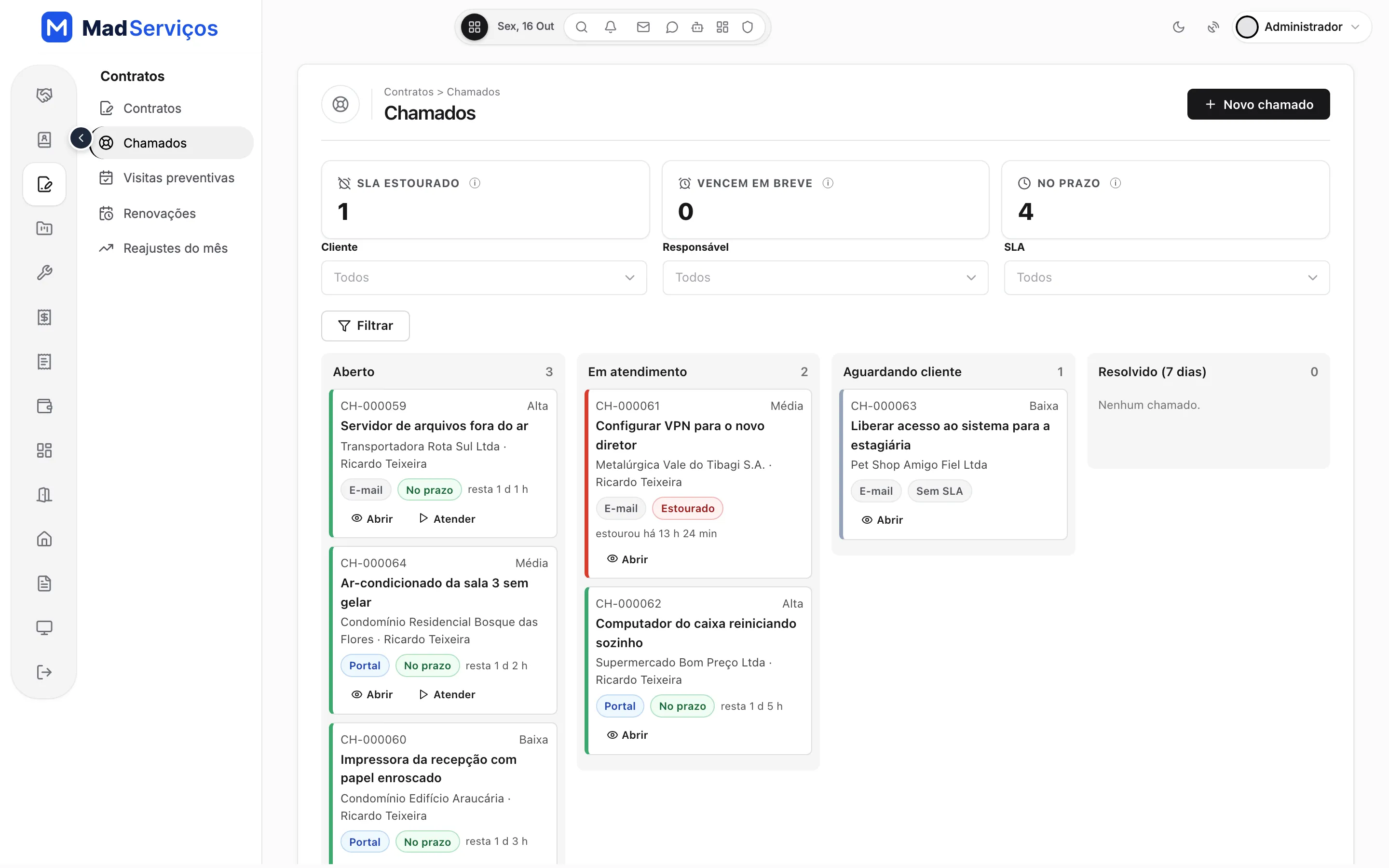
Tickets with response and resolution deadlines (SLA)
Each ticket has a response deadline and a resolution deadline. On the board, what is on time shows in green and what has run over shows in red.
For support contracts, the system tracks the hour allowance with overage and the preventive visits.
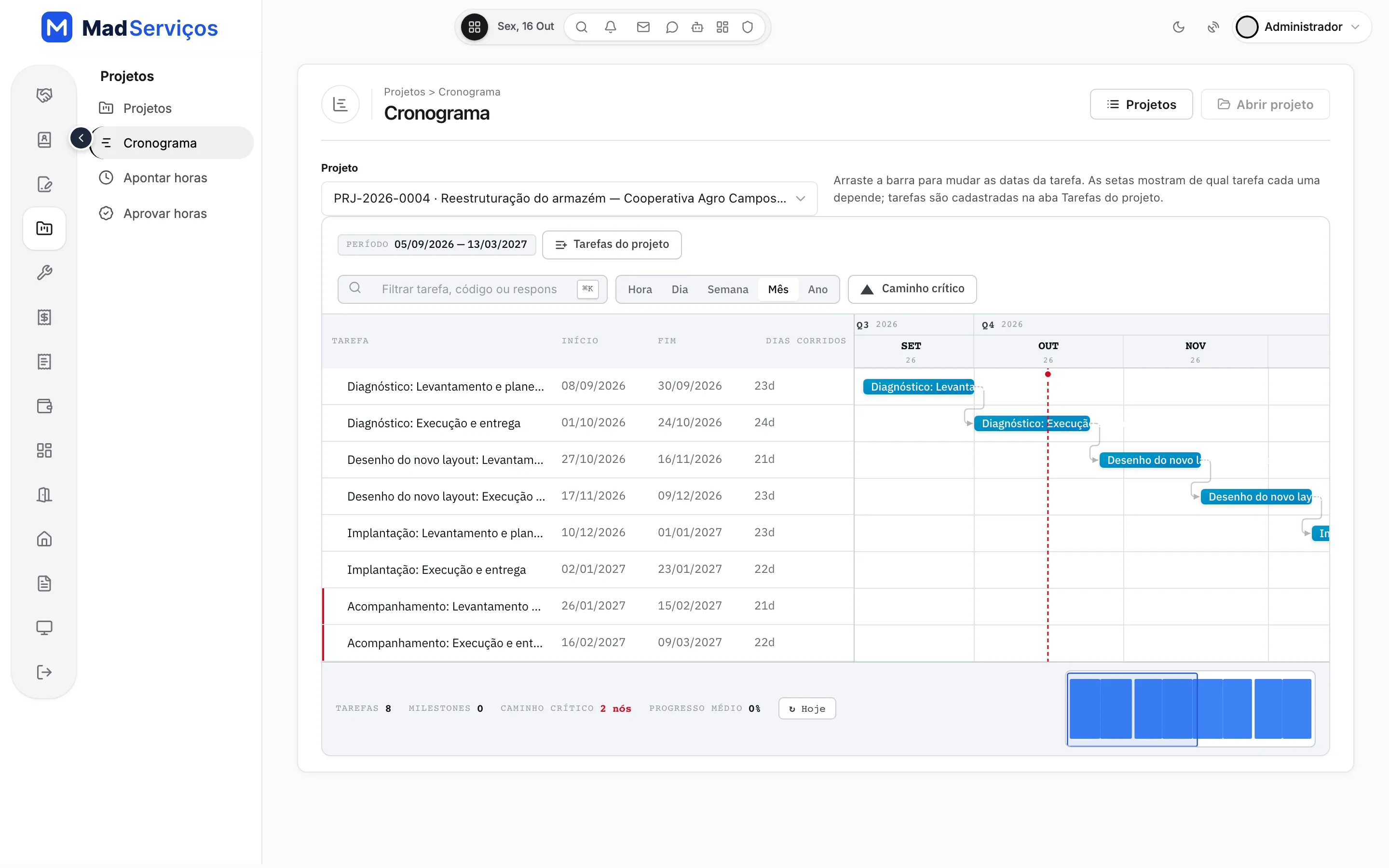
Milestone or hourly projects, with a Gantt schedule
A project has phases, milestones and tasks chained in the Gantt schedule, with a month view. When billing is hourly, timesheets are weekly and hours are approved before invoicing.
Batch month-end invoicing, with a preview per customer
At the end of the month, Invoice the month gathers each customer's measurements and shows a preview without saving anything, with the services, withholdings and the net amount receivable. All checked? It generates the invoices for every customer at once.
- Preview per customer before generating
- Withholdings calculated per customer or per service
- Accounts receivable, accounts payable and cash flow in the same system
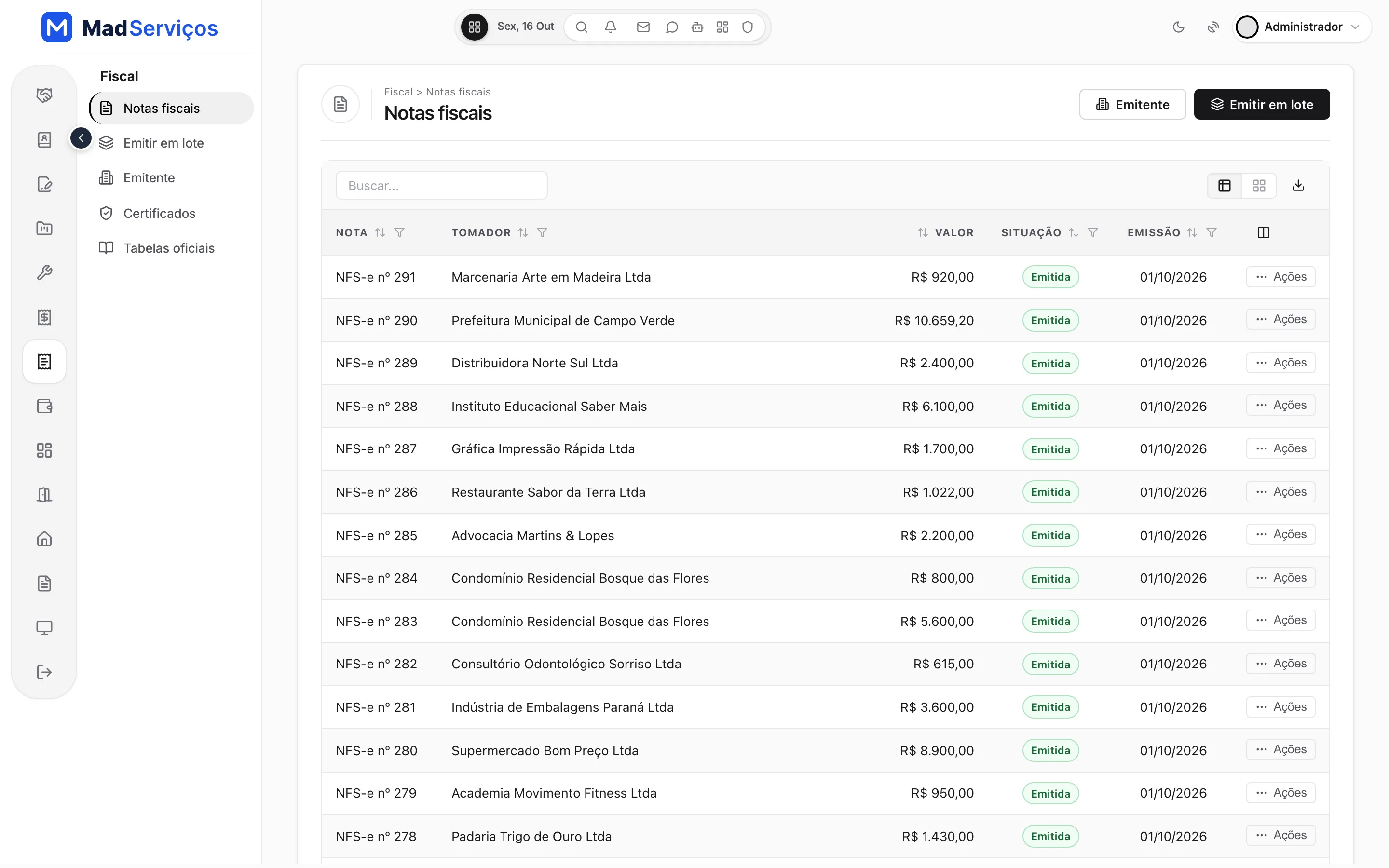
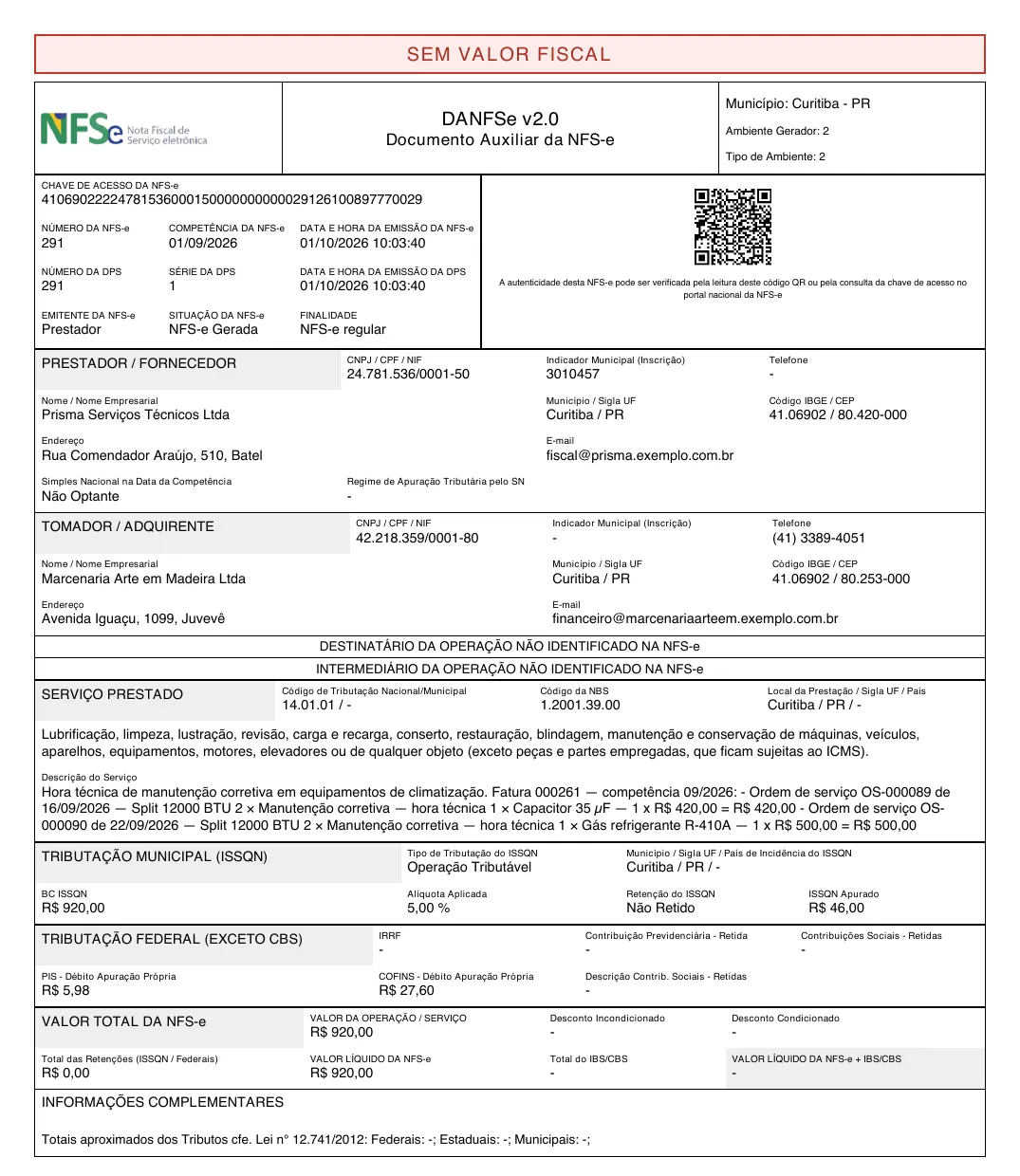
NFS-e Nacional with DANFSe and XML, without building the issuing from scratch
NFS-e in the national standard. Test in Demo mode, with no certificate. Homologation (the tax authority's test environment) and Production with the issuer's A1 certificate.
The invoice comes from the bill, with the DANFSe generated by the system itself and the XML. From the actions menu you download the PDF and XML, cancel and replace. In the issuer record you set the tax regime, Simples Nacional or standard, and withholdings are defined per customer or per service.
Pix copy-and-paste and a customer portal on the phone
In the portal, the customer sees the open invoice, copies the Pix code with the invoice amount and downloads the invoice as PDF and XML. They can also open tickets and follow proposals, all from their phone.
You enter the company account's Pix key, and the money goes straight to it. The payment is recorded on the invoice screen or arrives by itself, when your bank or provider notifies the system's receiving address (webhook).
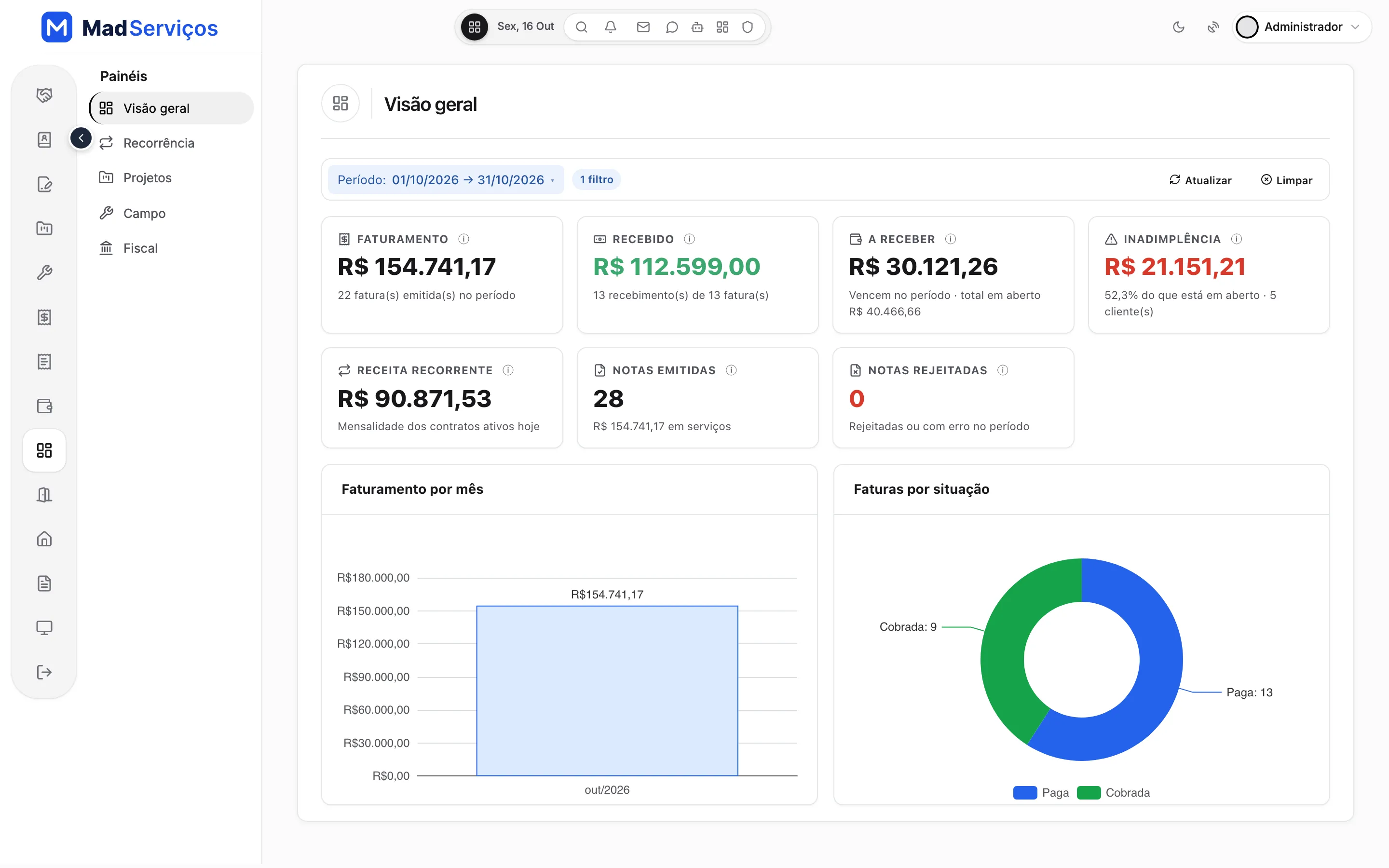
Dashboards for billing, overdue payments and recurring revenue
The overview dashboard shows billing, what has been received, what is receivable, overdue payments and recurring revenue. There are five dashboards in all, with the recurrence one among them.
Multiple companies in the same system
Each unit of the system is a company, with its own issuer, certificate, series and numbering. Customers, contracts, invoices and notes are kept separate by unit, and each user works in the unit they belong to.
Its own issuer
Certificate, series and invoice numbering per company.
Separate data
One unit's customers, contracts, invoices and notes don't show up in another.
Access by unit
Each user works in the unit they belong to.
Who it's for
MadServiços is bought by whoever delivers systems: the dev, the software agency, the freelancer or the business owner who uses MadBuilder to serve service companies. You adapt the project in Studio, through the visual editor or by asking the AI agent, add your customer's brand, and publish it to their server or to MadCloud.
Delivery is to the end customer, the service company that will use the system. The resale terms are in the first FAQ question.
What MadServiços costs and how buying works
$—, a one-time payment per account. Hosting and your MadBuilder account plan are separate. MadServiços is a MadBuilder project: you buy it once and it becomes your own project, which you change and publish whenever you want.
- Buy onceIn the MadBuilder store, with a one-time payment through Mercado Pago. The purchase shows up under My purchases.
- Create the project in your accountMadServiços shows up under New project › Templates. One click creates the project, with the Online Trial and a sample company to explore.
- Adapt and publishChange screens, fields and rules in Studio. Publish to your customer's server or to MadCloud.
What's in the project
- The three modules: recurring contracts, projects and hours, work orders
- The customer portal and the five dashboards
- The official tables preloaded, such as the LC 116 list and NBS
- Access roles, financial categories, adjustment indexes and checklist templates, set up on the first run
- More than 50 tables and more than 70 screens
- The project's PHP/Laravel code, which is also yours
- Built by MAD Solutions Ltda, from São Paulo, Brazil (CNPJ 51.888.856/0001-86)
What you need
- A MadBuilder account. MadServiços comes in as a project and counts toward the project limit of your plan
- Hosting, bought separately: on MadCloud or on your customer's server
- The company's Pix key, to generate the Pix copy-and-paste code
- The issuer's A1 certificate, only for NFS-e Homologation and Production
Certificates and real customer data do not travel with the system.
Questions about MadServiços
Can I resell MadServiços?
Yes, to your end customer: you deliver the system to service companies, with each one's brand, domain and server, and charge for your work however you like. You may not resell or pass on the system, the project or the code to other developers or software companies.
How do I get the system?
After you buy, MadServiços shows up under New project › Templates in your MadBuilder account. One click creates the project, with the Online Trial and the sample company to explore. From there you adapt it in Studio and publish it to your customer's server (SSH, Git or ZIP) or to MadCloud.
Do I need to code to deliver it?
Not to put it into use: set up your customer's issuer, services and team. To adapt screens, fields, texts or the look, use Studio's visual editor or ask the AI agent. If you do code, you get the PHP/Laravel code of the entire project, with no lock-in.
Do I need a digital certificate to test NFS-e?
No. Each company has an issuing mode: in Demo mode the system generates a number, key and DANFSe (the printable invoice) with a "no fiscal value" banner and does not talk to Sefin, Brazil's national tax authority for service invoices. To issue for real, you upload your A1 certificate (.pfx) in the issuer record; it is stored encrypted and the system warns you before it expires. Real issuing only turns on after an invoice has been issued in Homologation, Sefin's restricted production (test) environment.
Does it work in my municipality?
The system issues through NFS-e Nacional, the national standard of Sefin Nacional (nfse.gov.br). It serves providers in a municipality that has already adopted that standard. If your city hall still uses its own issuing system, confirm with them before turning on production; Demo mode lets you explore the whole flow in the meantime.
Does it work for Simples Nacional and Lucro Presumido?
Yes. In the issuer record you set the tax regime. Under Simples Nacional (small businesses) the invoice carries the Simples rate; under the standard regime, such as Lucro Presumido, the system calculates ISS, PIS, COFINS, CSLL, IR and INSS, with withholdings set per customer or per service.
What about the tax reform, IBS and CBS?
The IBS and CBS fields already exist on the invoice and are off by default, so nothing changes in what you issue today. When your operation needs them, turn them on in the issuer record; the tax classification and operation indicator tables come preloaded.
How does Pix reach me?
You enter the company account's Pix key (Pix is Brazil's instant payment system) and the system generates the copy-and-paste code with the invoice amount. The money goes straight to your account, with no middleman. The payment can be recorded on the invoice screen or arrive by itself, if your bank or payment provider notifies the system's receiving address (webhook). The system does not read your bank statement.
Can I run more than one company in the same system?
Yes. Each unit of the app is a company, with its own issuer, certificate, series and numbering. Customers, contracts, invoices and notes are kept separate by unit, and each user works in the unit they belong to.
What comes ready?
The three modules (recurring contracts, projects and hours, work orders), the customer portal, the five dashboards and the official tables preloaded: national taxation, NBS, the LC 116 list, IBS/CBS and municipalities. The first run sets up access roles, the collections schedule, financial categories, adjustment indexes and checklist templates on its own. Certificates and real customer data do not travel with the system.
How much does MadServiços cost?
$—, a one-time payment per account, through the MadBuilder store. Hosting and your MadBuilder account plan are separate (MadServiços counts toward the project limit).
Does MadServiços have boleto, card payments or bank integration?
No. Billing is by Pix copy-and-paste, with manual payment recording or by webhook. The system does not read your bank statement and has no boleto or card payments.Need something that isn't here? Seecustom development.
Is the project mine?
Yes. The purchase creates an independent copy in your MadBuilder account: changes to the original system do not affect yours.
Can I change screens, fields and rules?
Yes, all in the Studio: screens, tables, fields, rules, menu, permissions and theme. The generated code is yours too.
Where do I publish it?
On MadBuilder Hosting (MadCloud) or on your own server. The project limit of your plan still applies.
How does payment work?
One-time, per account, through the Manager store (Mercado Pago). Once approved, your account can create as many projects from it as you like, and the purchase shows up under My purchases.
Open the sample company and buy when you're ready.
$—, one-time payment. The project is yours: change it in Studio and publish it anywhere.
In the demo, Try it now gives you a sample company of your own for 24 hours, with no sign-up and no password.
