


MadOdonto: dental practice management software, from the schedule to the dentist's payout
Scheduling, odontogram, treatment plan and quote, clinical notes, insurance plans and dentist payouts in one system. NFS-e Nacional and the website with plans and a free trial come ready-made.
MadOdonto is a ready-made app for dental clinics: schedule by dentist and chair, patient chart with odontogram, treatment plan and quote, clinical notes, finance, insurance plans, dentist payouts, inventory and NFS-e (Brazil's national electronic service invoice). It's a one-time payment of $— and becomes a project in your MadBuilder account, already built as SaaS, with a website, plans and a free trial.
No sign-up and no password: in See the demo, click “Abrir minha clínica de demonstração” (the app’s button, in Portuguese) and get a sample clinic of your own for 24 hours. Buying requires logging in to your MadBuilder account.
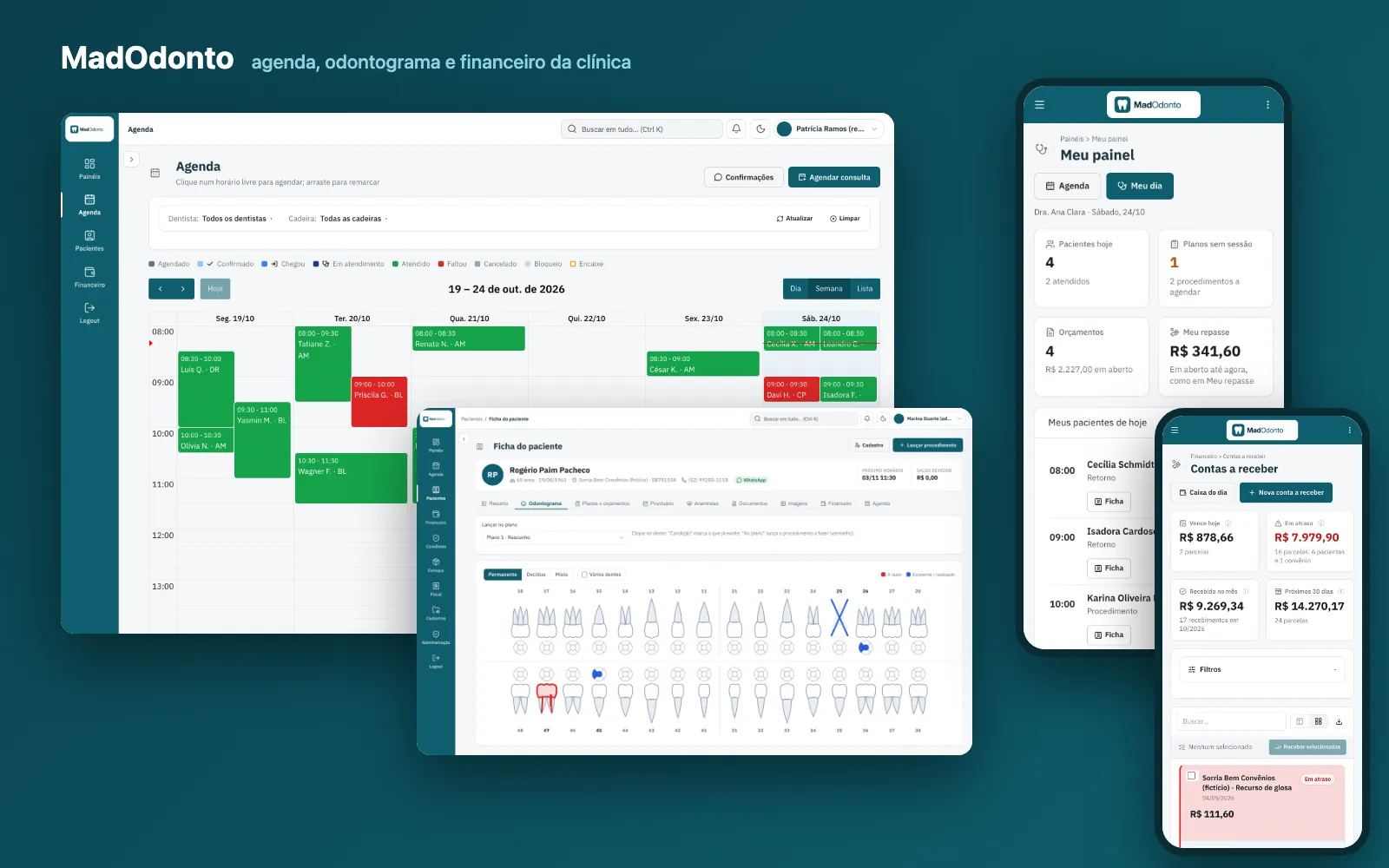
Your browser couldn’t play this video. Open the video file
Read the transcript (in Portuguese)
A dental clinic asks for scheduling, dental charting, patient records, insurance and invoicing. From scratch, that's months.
Start with MadOdonto ready to go, and deliver it the clinic's way.
Ready out of the box. Scheduling by dentist and chair, one color per status. The patient file, with dental charting by tooth and surface. The treatment plan and the quote, which the patient approves by signing on screen.
Clinical records, with signed notes and corrections only by addendum. Prescription, medical certificate and consent form as PDF, with the health alert at the top. Insurance, with price lists, claims, monthly batches and denials. And each dentist's payout, calculated per procedure. Brazil's national e-invoice: test in Demo mode, no certificate needed, then issue with the clinic's A1 certificate. Finance and dashboards per role: revenue, overdue payments and denials. And on mobile, the dentist's day: patients, quotes and payouts. And it's already SaaS: a site with plans and a free trial, and every new clinic starts ready. More than fifty tables, more than a hundred screens, and each clinic with its own data.
Now, your work. The system arrives as a project in your account, and you open it in your Studio: screens, tables and code.
Open a screen in the visual editor. Click the column, and change the label to the clinic's term: here, WhatsApp.
Save, and click Test now.
In moments, the app already shows the change. Underneath it's PHP, Laravel and Blade. The code is yours, no strings attached. Resell to your end client, under your brand, on the clinic's server or on MadCloud.
MadOdonto. It's under Ready-made apps, inside MadBuilder. Try the demo before you buy.
Complete dental software: schedule, patient chart and finance
A dental clinic system that brings the schedule, the patient chart with odontogram, quotes, insurance plans, dentist payouts and invoicing together in one place. Every part below is a screen that comes ready-made.
- Front desk and scheduleSchedule by dentist and chair, walk-in slots, blocked times and appointment reminders by WhatsApp link, with the confirmation marked on screen.
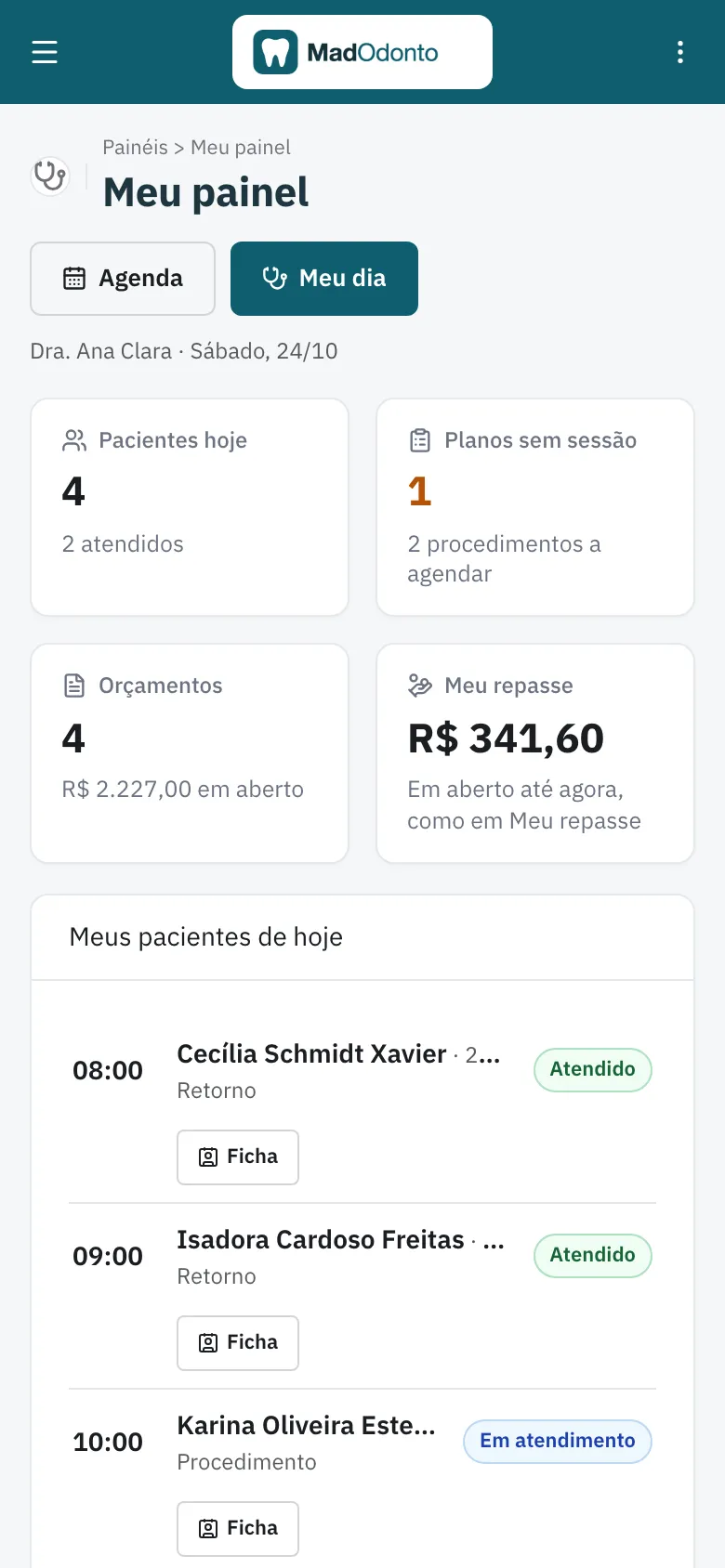
- Dentist and patient chartOdontogram by tooth and surface, treatment plan and quote, signed clinical notes and My Day on the phone.
- Finance and insurance plansAccounts receivable and payable, insurance batches with denials, dentist payouts and national NFS-e invoicing.
- Owner and multi-clinic groupsManagement dashboard, several branches sharing the same patients, and the website with plans and a free trial.
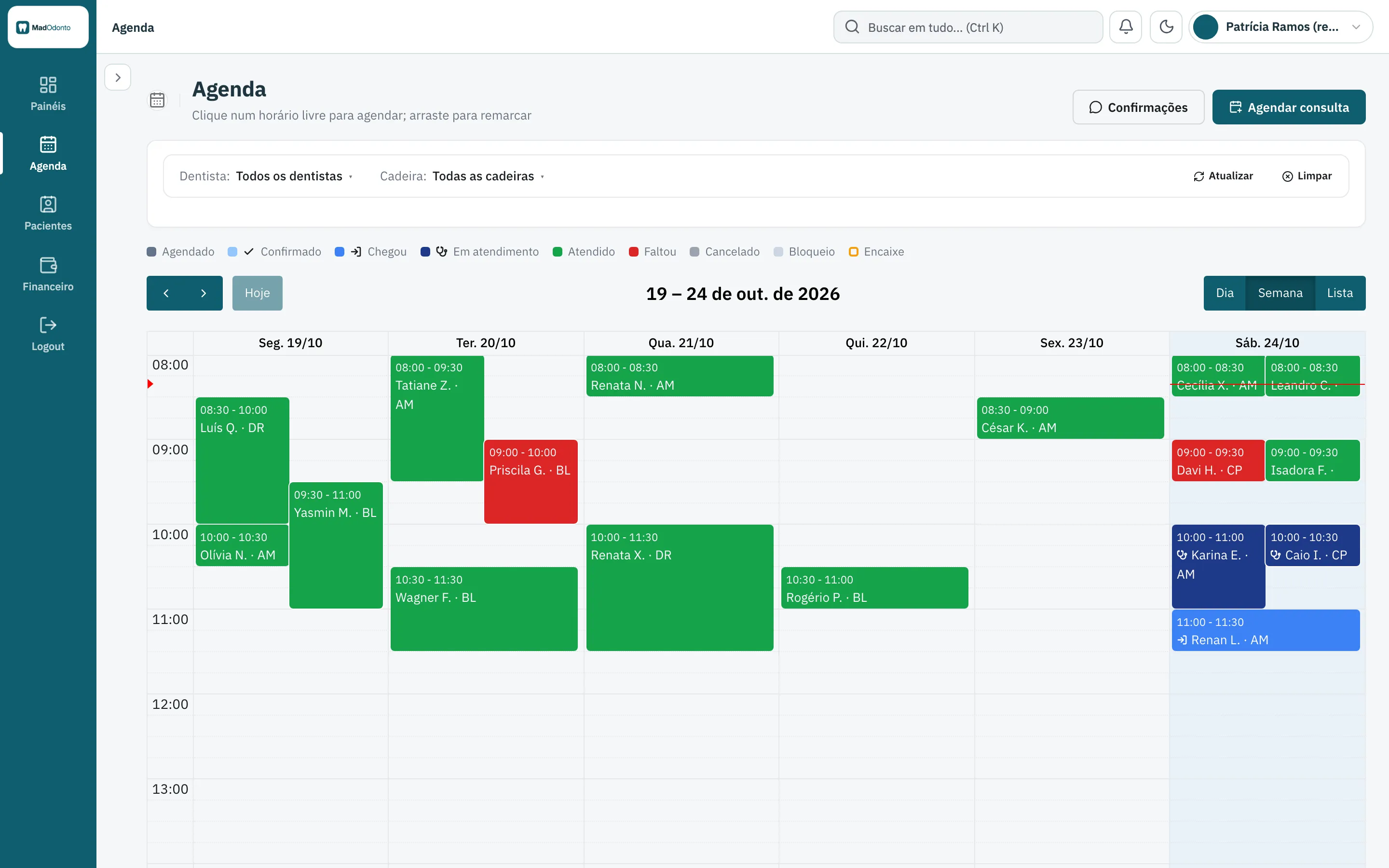
Dental clinic scheduling by dentist and chair
The schedule has day, week and list views by dentist and by chair, with walk-in slots and blocked times. Each status has its own color: scheduled, arrived, seen, no-show.
The appointment reminder opens the WhatsApp conversation with the text ready, through a link, and the front desk sends it from there. There is no paid API, and the confirmation is marked on the Confirmations screen.
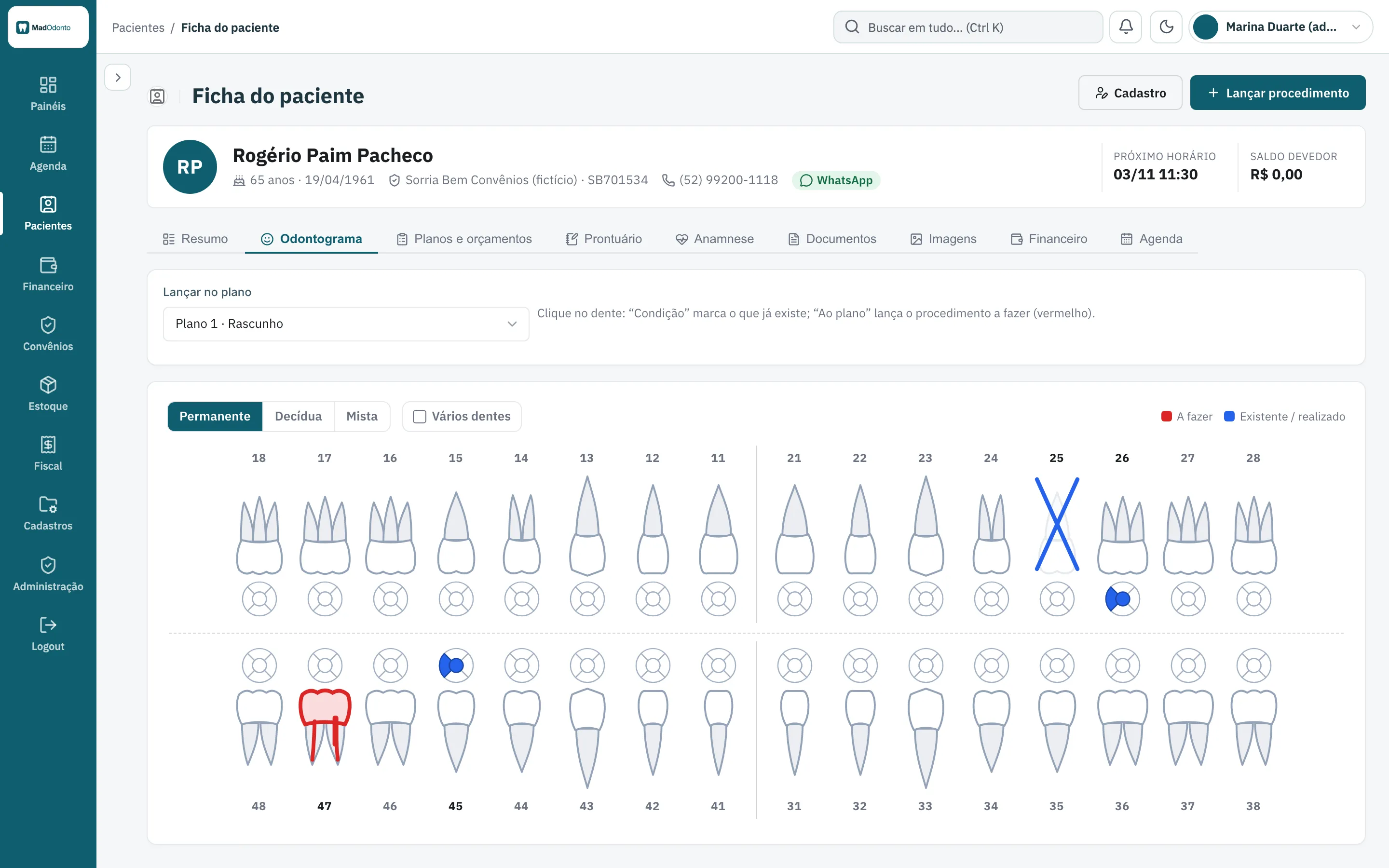
Digital odontogram by tooth and surface
In the patient chart, you mark what already exists and what needs to be done, in permanent, primary or mixed dentition. Existing work shows in blue and the procedure to be done in red, by tooth and surface.
From the marked tooth, the procedure goes straight into the patient's treatment plan.
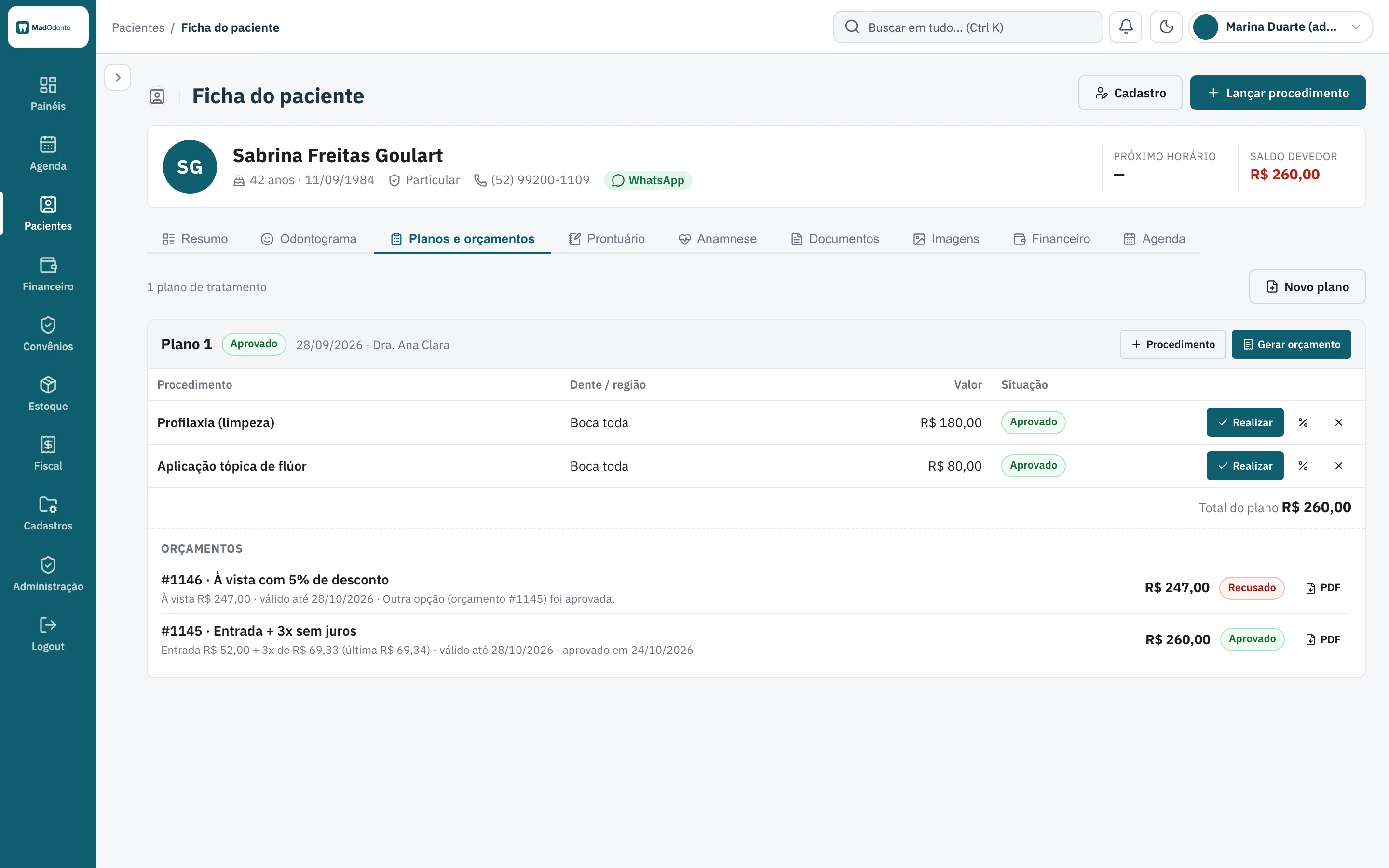
Dental treatment plan and quote with approval on screen
The plan gathers the procedures by tooth, with pay-in-full or installment options. Each quote comes out as a PDF, and the patient approves it by signing on screen.
- More than one quote option per plan, with the approved one and the declined one side by side
- A PDF of each quote
- A dashboard list of quotes to present again, with the WhatsApp link
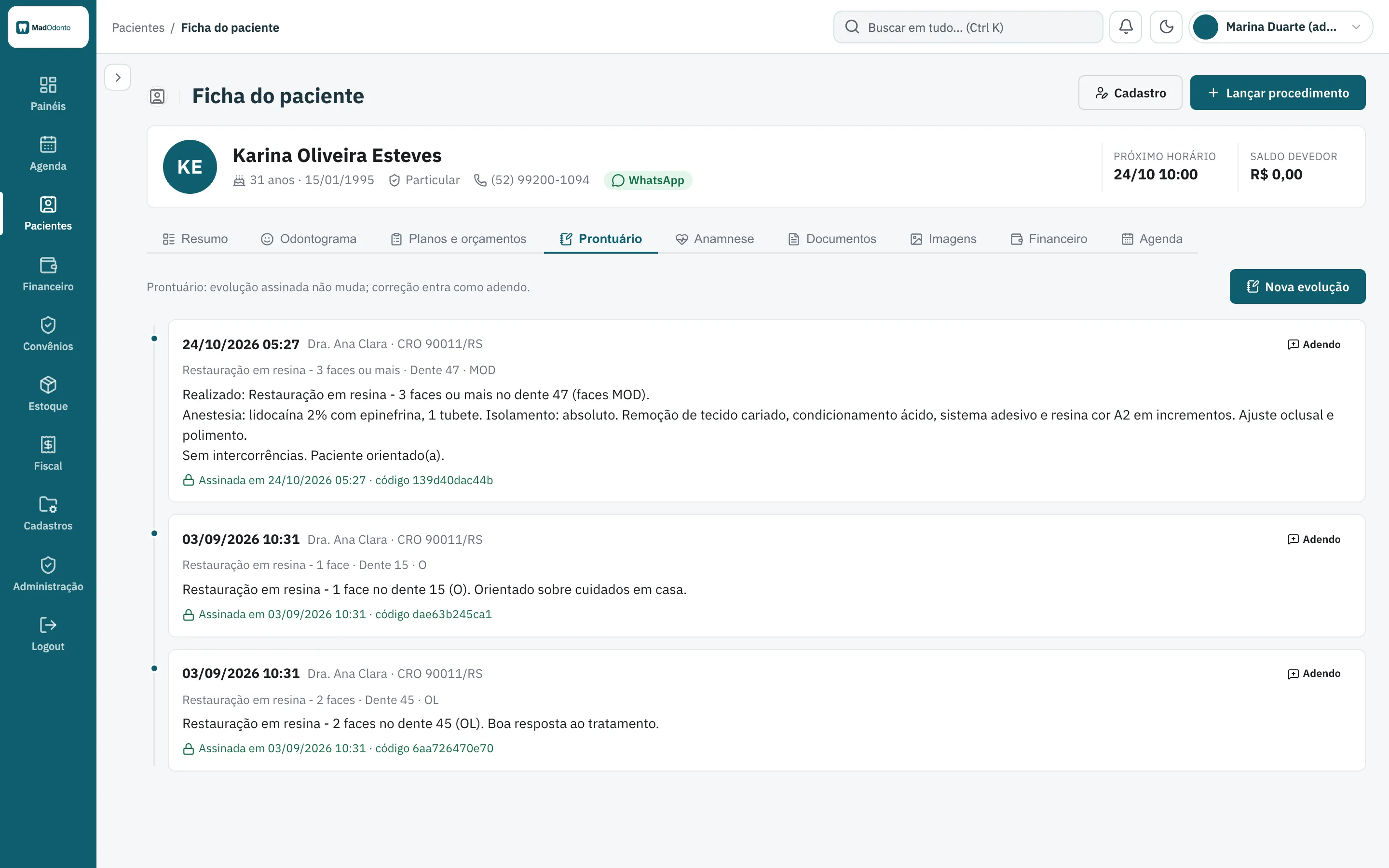
Dental clinical notes with signed entries and addenda
Each signed entry stays as it is: it does not change and cannot be erased. A correction goes in as an addendum, with a verification code.
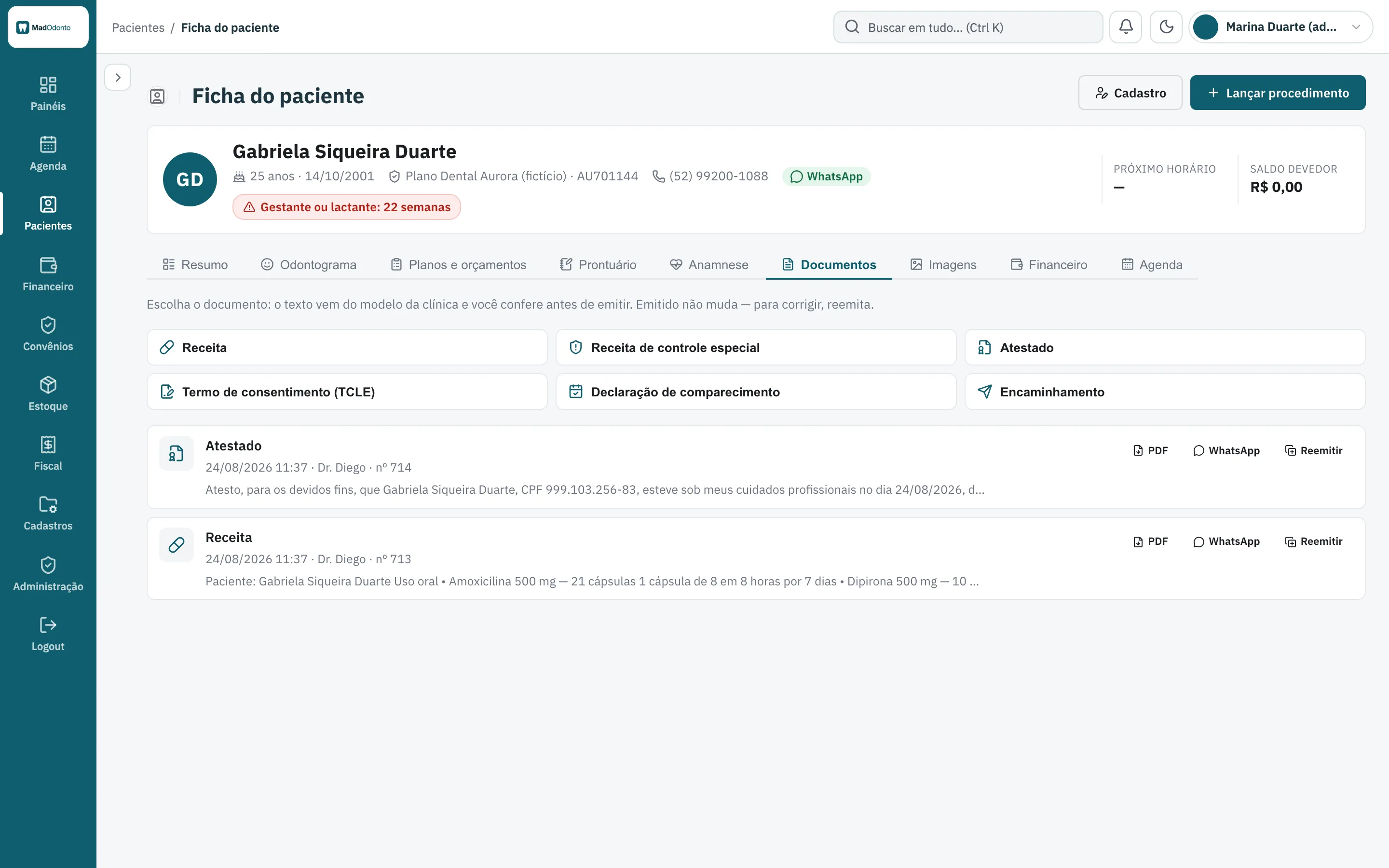
The medical history carries health alerts, such as the pregnancy alert, which stays at the top of the chart. Prescriptions, medical certificates, informed consent forms, declarations and referrals come out as PDFs, with WhatsApp sending and reissuing.
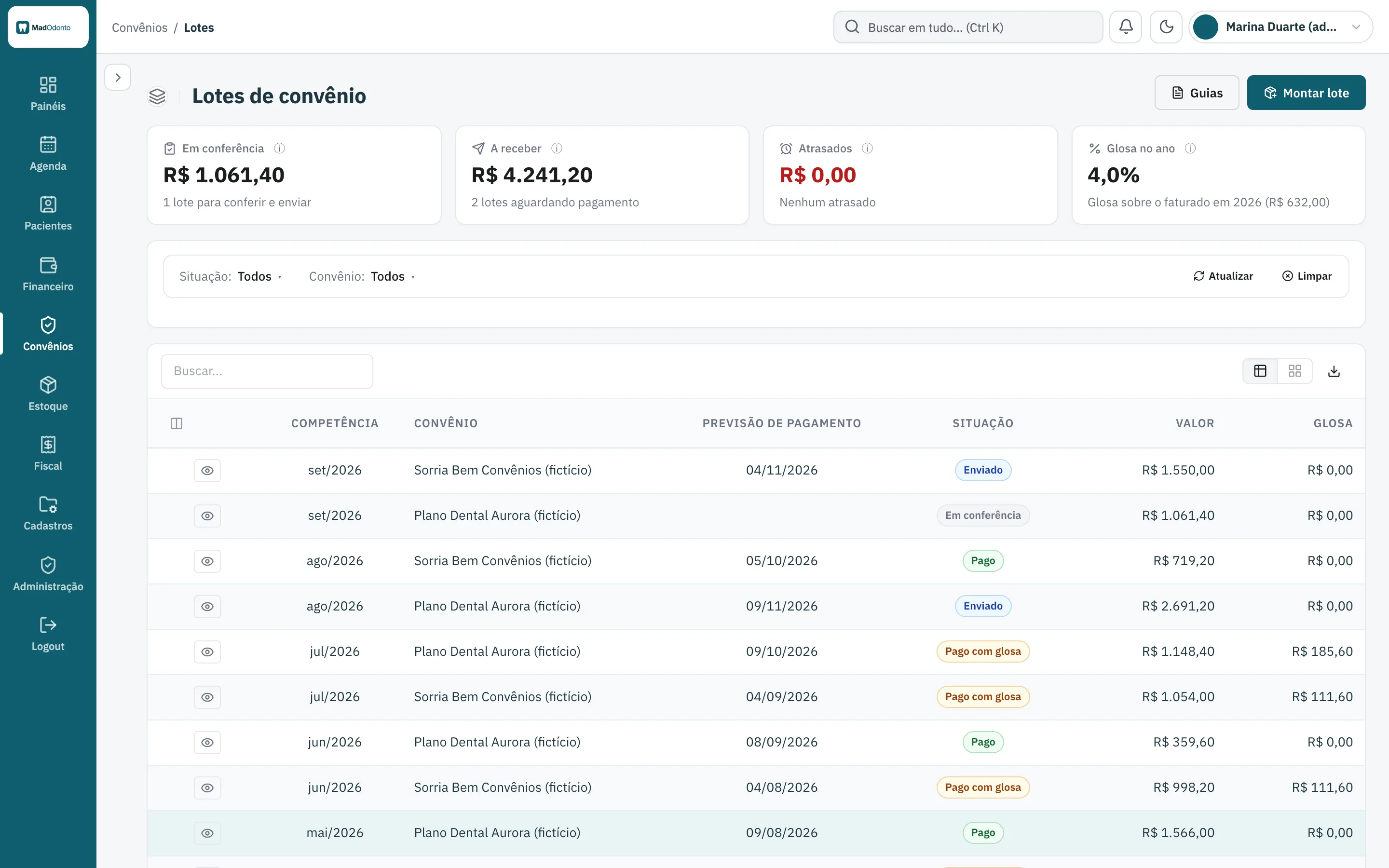
Dental insurance plan control: claim forms, batches and denials
Each insurance plan (convênio) has its own price table. The claim form is generated from the procedure performed, and the month's batch gathers the forms by competence month, with a PDF, denials (glosas), appeals and the receipt of the batch payment.
The system does not generate TISS XML. Sending the batch to the insurer is done outside the system, the way the clinic already does it today.
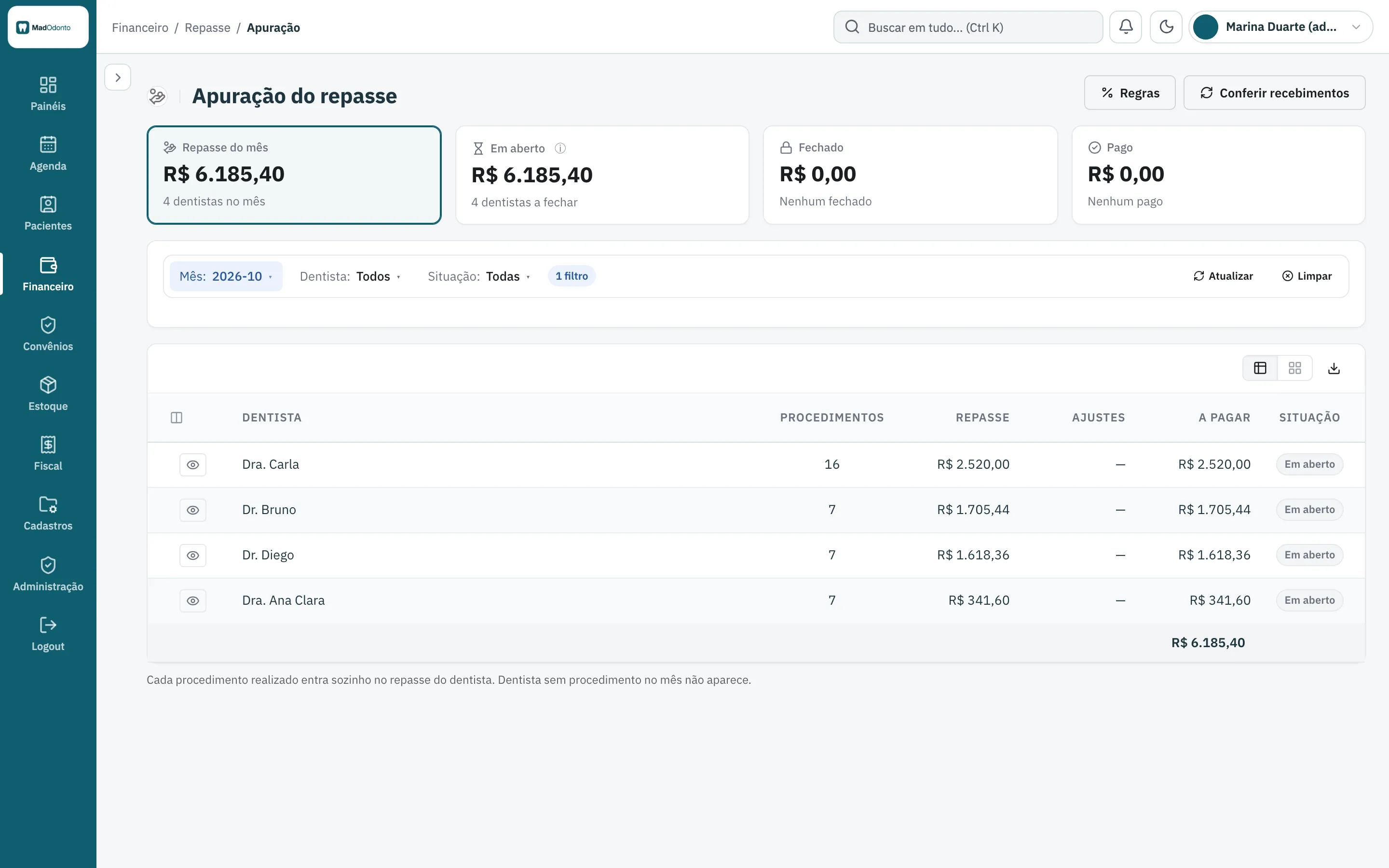
Dentist payout (repasse) calculated on every procedure
Each dentist has their own payout rule, the share of each procedure that goes to them. The amount is calculated on every procedure performed, and the month's statement shows each dentist's payout, ready for closing.
- Accounts receivable and payable, with partial payments
- Daily cash, overdue accounts and income statement
- Inventory with automatic deduction: the procedure kit deducts the material, with minimum, expiry alerts and a shopping list
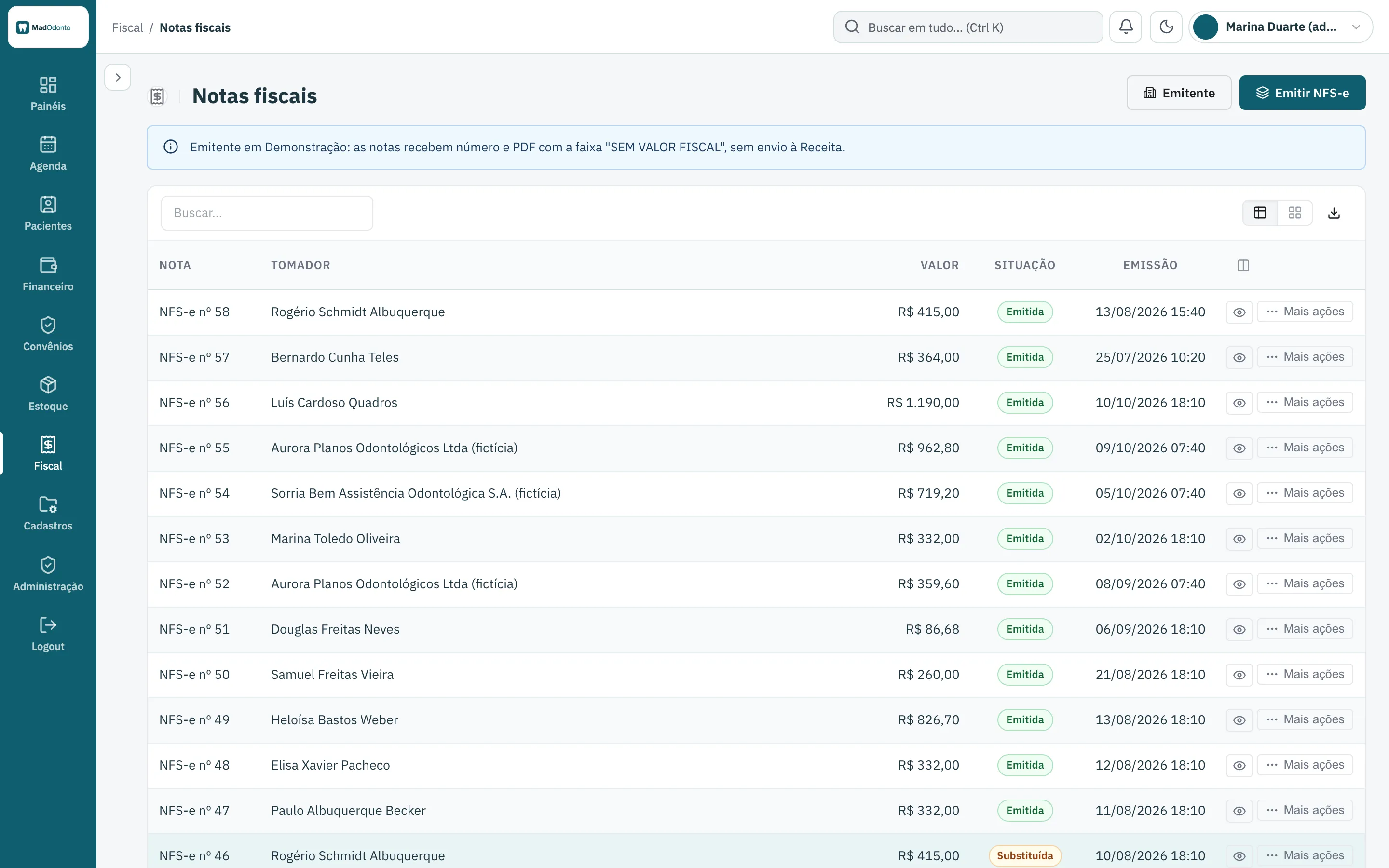
NFS-e Nacional for dental clinics, with PDF and XML
NFS-e in the national standard. Test in Demo mode, with no certificate. Production with the clinic's A1 certificate.
The invoice comes out of the payments received, in batch, with PDF and XML, cancellation and replacement. In Demo mode, the system generates the number and the PDF with a “no fiscal value” banner, without sending anything to the city hall. Real issuing only turns on after an invoice has been issued in Homologation.
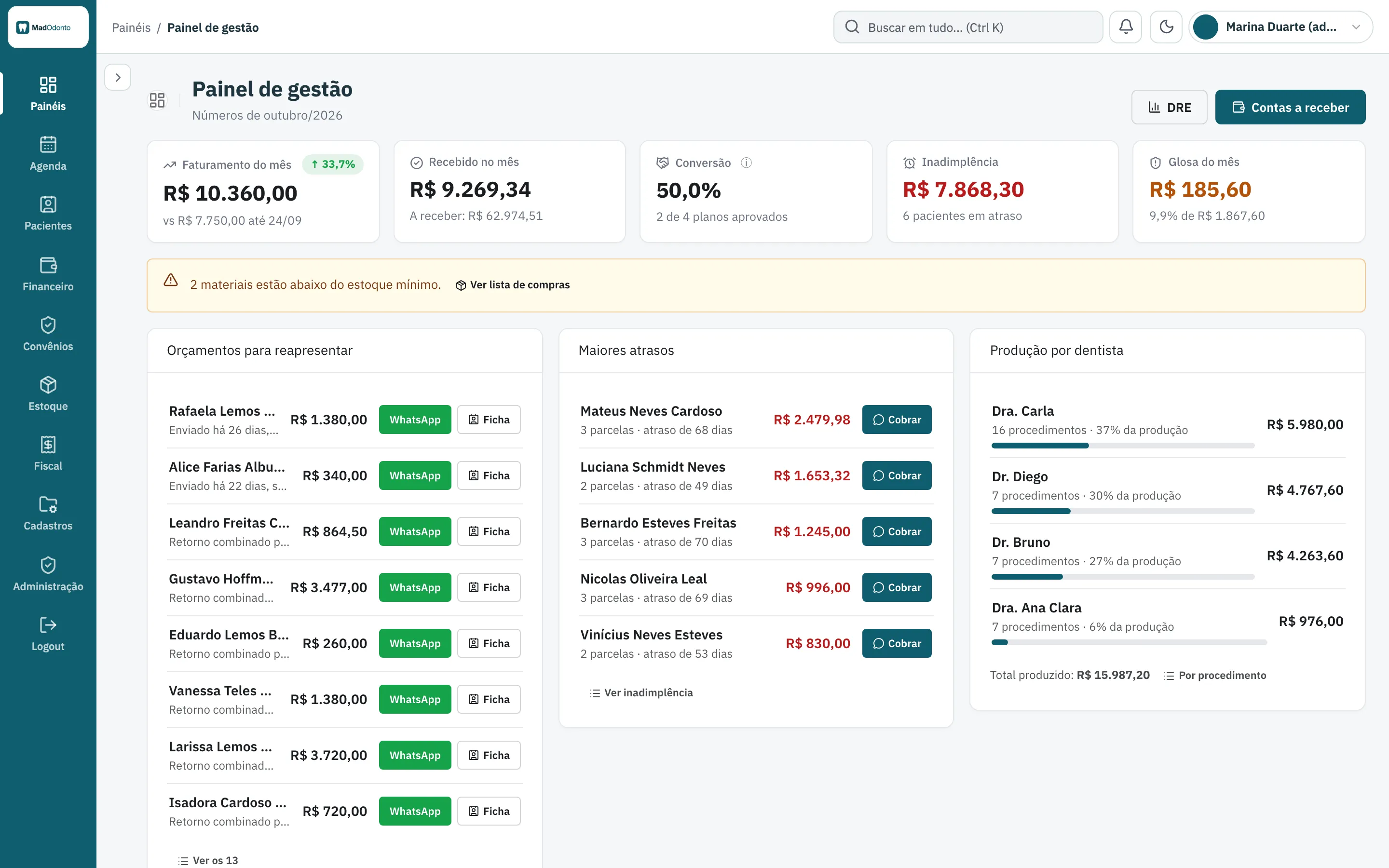
Management dashboard: revenue, overdue accounts, denials and production by dentist
The management dashboard shows the month's revenue, what has been received, overdue accounts and denials, with the quotes to present again and each dentist's production. There are dashboards by role: dentists, front desk and finance see what is theirs.
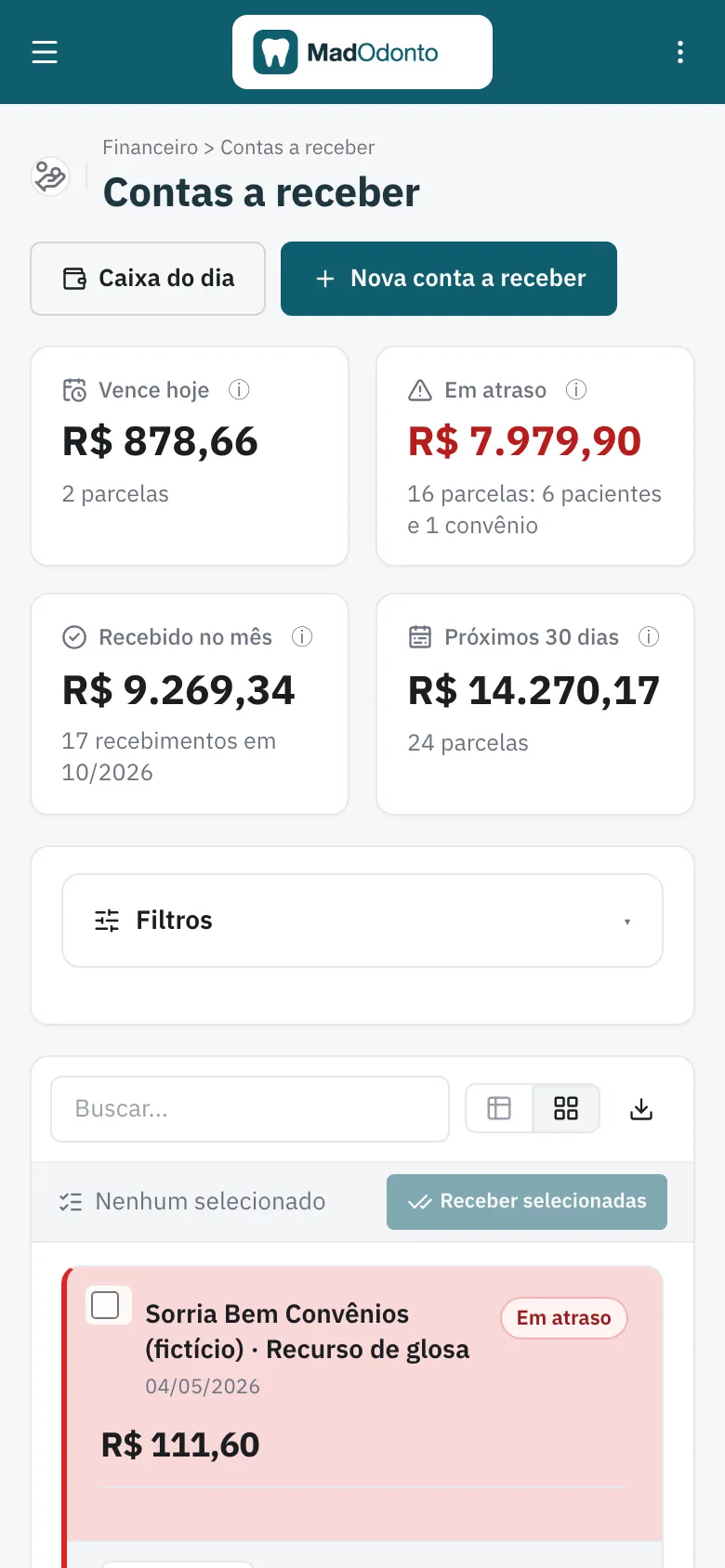
Clinic software on the phone: the dentist's day and accounts receivable
The schedule, the patient chart, the dentist's My Day and accounts receivable open full screen on the phone.
Several branches and several clinics in the same system
Each clinic is a company, with its data kept separate from the others, and each branch is a unit. Branches of the same clinic share patients, and each unit has its own schedule, its own cash register and its own invoices.
Separate clinics
Each clinic has its data kept separate from the others.
Shared patients
Branches of the same clinic see the same patients.
Schedule, cash and invoices by unit
Each branch has its own schedule, its own cash register and its own invoices.
Built as SaaS: a website with plans and a free trial for each clinic
MadOdonto is already a SaaS. The project brings the public website with plans by module, and whoever signs up gets a new clinic, already set up with roles, records and templates, and a trial period.
Each plan unlocks the modules in the contract, and whatever is outside the plan disappears from the menu. Plan names, modules, limits and prices are yours: you adjust them in the project.
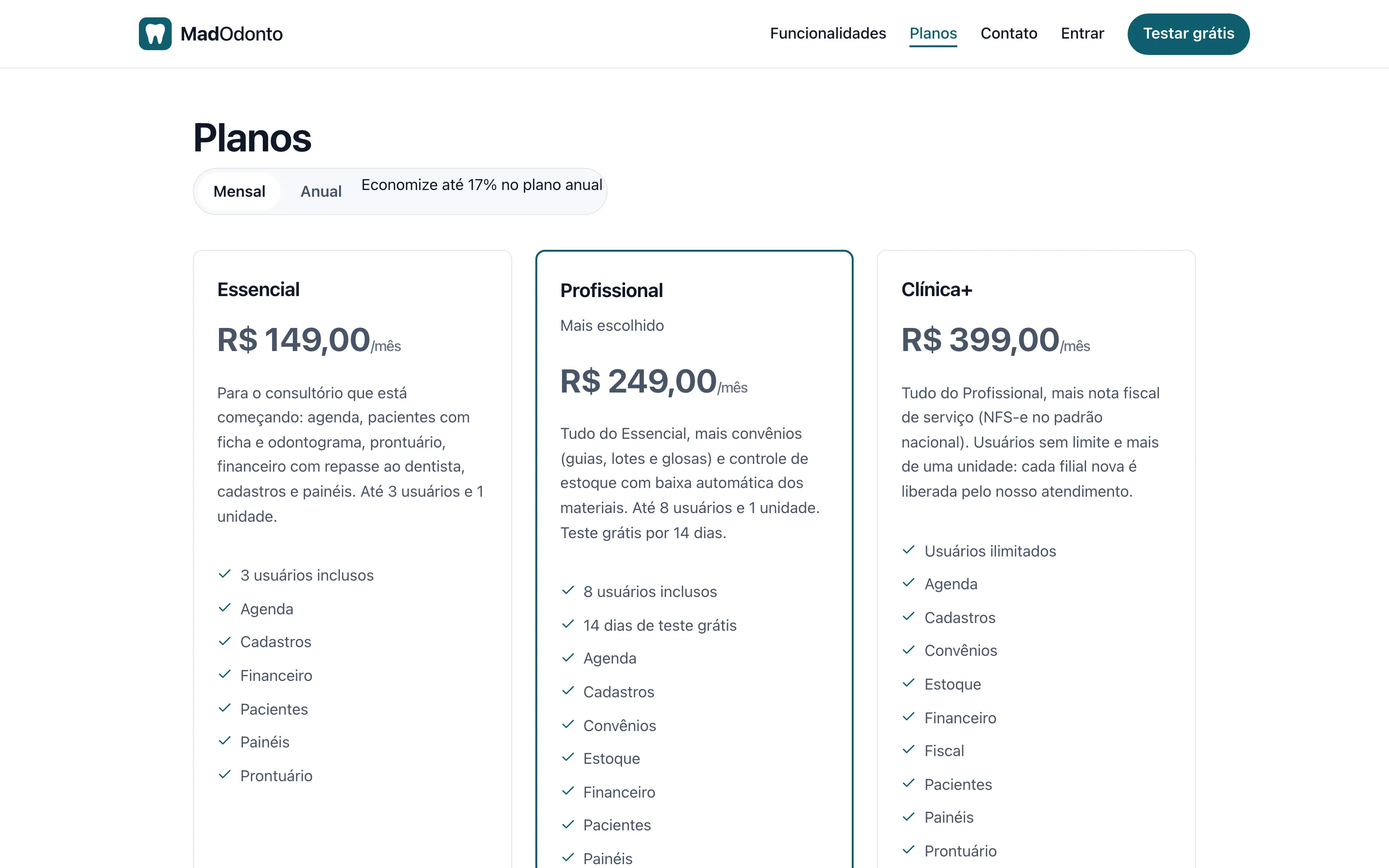
Website and sign-up
Public website with plans and a sign-up that creates the new clinic, with roles, records and templates loaded.
Plans by module
Three sample plans, Essencial, Profissional and Clínica+, which you edit.
Subscription billing
Uses the framework's own billing and comes turned off: the free trial is enough to get to know it.
Who the purchase is for
MadOdonto is bought by people who deliver systems: the developer, the software house, the freelancer or the business owner who uses MadBuilder to serve dental clinics. You adapt the project in Studio, with the visual editor or by asking the AI agent, add the clinic's brand and publish it to their server or to MadCloud.
The delivery is to the end customer, the clinic that will use the system. The resale terms are in the first FAQ question.
How much MadOdonto costs and how buying works
$—, a one-time payment per account. Hosting and your MadBuilder account plan are separate. MadOdonto is a MadBuilder project: you buy it once and it becomes your own project, which you change and publish whenever you like.
- Buy onceIn the MadBuilder store, with a one-time payment through Mercado Pago. The purchase shows up under My purchases.
- Create the project in your accountMadOdonto shows up under New project › Templates. One click creates the project, with the Online Trial to explore.
- Adapt and publishChange screens, fields and rules in Studio. Publish to your customer's server or to MadCloud.
What comes in the project
- Scheduling, patient chart with odontogram, treatment plan and quote, clinical notes, medical history and documents
- Finance, insurance plans, dentist payouts, inventory and NFS-e Nacional
- Dashboards by role and the public website with plans and a free trial
- Access roles (clinic administrator, dentist, front desk and finance) and templates for documents, medical history forms and messages
- A fictional clinic in the Online Trial, to explore before delivering
- The PHP/Laravel code of the project, which is yours too
- Built by MAD Solutions Ltda, from São Paulo, Brazil (CNPJ 51.888.856/0001-86)
What you need
- A MadBuilder account. MadOdonto comes in as a project and counts toward the project limit of your plan
- Hosting, bought separately: on MadCloud or on your customer's server
- The clinic's A1 certificate, only for NFS-e production
Digital certificates and real patient data do not travel with the system.
Questions about MadOdonto
Can I resell MadOdonto?
Yes, to your end customer: you deliver the system to dental clinics, with each one's brand, domain and server, and charge for your work however you like. You may not resell or pass on the system, the project or the code to other developers or software companies.
What comes ready?
Scheduling, the patient chart with odontogram, treatment plan and quote, clinical notes, medical history and documents, finance, insurance plans (convênios), dentist payouts, inventory, NFS-e, dashboards by role and the public website with plans. Access roles also come set up (clinic administrator, dentist, front desk and finance), along with templates for documents, medical history forms and messages. Digital certificates and real patient data do not travel with the system.
How do I get the system?
After you buy, MadOdonto shows up under New project › Templates in your MadBuilder account. One click creates the project, with the Online Trial and the sample clinic to explore. From there you adapt it in Studio and publish it to your customer's server (SSH, Git or ZIP) or to MadCloud.
How do I adapt it to my customer? Do I need to code?
Not to put it into use: set up the clinic, the dentists, the procedures and the prices. To change screens, fields, texts, documents or the look, use Studio's visual editor or ask the AI agent. If you do code, you get the PHP/Laravel code of the entire project, with no lock-in.
Does NFS-e really issue invoices?
Each clinic has an issuing mode. In Demo mode, the system generates a number and a PDF with a "no fiscal value" banner, without sending anything to the city hall or requiring a certificate. To issue for real, upload the clinic's A1 certificate (.pfx) in the issuer record; real issuing only turns on after an invoice has been issued in Homologation (the test environment). The standard is NFS-e Nacional, Brazil's national electronic service invoice: check with your customer's city hall whether it has already adopted it.
Does it bill insurance plans with TISS XML?
No. The system handles what happens inside the clinic: a price table per insurance plan (convênio), a claim form generated from the procedure performed, a monthly batch with PDF, denials (glosas), appeals and receipt of the batch payment. Sending the batch to the insurer is done outside the system, the way the clinic already does it today. TISS XML, the standard Brazilian insurer file format, is not part of this version.
Does WhatsApp send the messages by itself?
No. The appointment reminder and the payment reminder open the WhatsApp conversation with the text ready, through a link, and the front desk sends it from there. There is no paid API and no number to contract, and the system does not read the replies: the confirmation is marked on the Confirmations screen.
How do the plans and the free trial work?
The project comes with the public website and three plans by module: Essencial, Profissional and Clínica+. Whoever signs up gets a new clinic, already set up with roles, records and templates, and a trial period. Each plan unlocks the modules in the contract; whatever is outside the plan disappears from the menu. Plan names, modules, limits and prices are yours: adjust them in the project.
How do I charge the clinic's subscription?
The project uses the framework's own subscription billing, with integration to Mercado Pago, Banco Inter and Stripe, plus manual payment recording. In MadOdonto it comes turned off: the free trial is enough to get to know it. Before charging, turn billing on, enter the receiving account and test with a real payment.
Does it work for a group with several branches?
Yes. Each clinic is a company, with its data kept separate from the others, and each branch is a unit. Branches of the same clinic share patients, but each unit has its own schedule, its own cash register and its own invoices. The plan sets how many users the clinic has; each new branch is enabled by you, the owner of the system.
How much does MadOdonto cost?
$—, a one-time payment per account, through the MadBuilder store. Hosting and your MadBuilder account plan are separate (MadOdonto counts toward the project limit).
Does MadOdonto have a patient portal, online booking or lab tracking?
No. The schedule is for the front desk and the dentists, and the system does not include a patient portal, online booking from the website or prosthesis and dental lab tracking.Need something that isn't here? Seecustom development.
Is the project mine?
Yes. The purchase creates an independent copy in your MadBuilder account: changes to the original system do not affect yours.
Can I change screens, fields and rules?
Yes, all in the Studio: screens, tables, fields, rules, menu, permissions and theme. The generated code is yours too.
Where do I publish it?
On MadBuilder Hosting (MadCloud) or on your own server. The project limit of your plan still applies.
How does payment work?
One-time, per account, through the Manager store (Mercado Pago). Once approved, your account can create as many projects from it as you like, and the purchase shows up under My purchases.
Open the sample clinic and buy when you're ready.
$—, one-time payment. The project is yours: change it in Studio and publish it anywhere.
No sign-up and no password: in See the demo, click “Abrir minha clínica de demonstração” (the app’s button, in Portuguese) and get a sample clinic of your own for 24 hours.
